Export DBX to EMLX
Total Ratings: 105 - Average Rating: 4.6 out of 5Export Outlook Express emails to Apple Mail with Export DBX to EMLX Tool. Instant and safe conversion of DBX files to EMLX file format is performed by the application keeping email formatting intact.
- Instant and safe way to export Outlook Express to Apple Mail
- Export Outlook Express emails with attachments
- Independent application for conversion
- Retains the same folder structure
- Convert any large Outlook Express DBX file
- Support Windows 10 and below versions
- Protect email formatting and email properties
- Easy to use application
- DBX to EMLX Exporter freeware
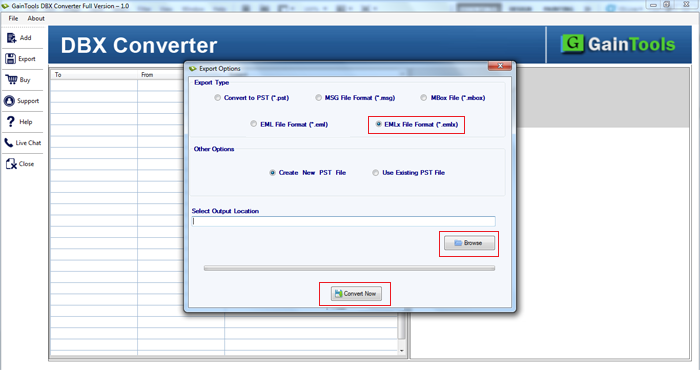
- Freedom to save EMLX files at any location
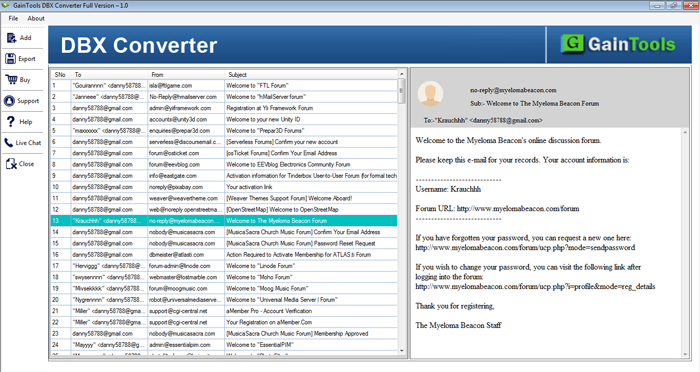
- Display every item of DBX before the conversion
- Desired DBX files conversion
- Unlimited database conversion from DBX 2 EMLX
Items to be exported using DBX to EMLX Converter
Emails
Outlook Express email messages are easily exported to Apple Mail EMLX file format. Without restricting the size of Outlook Express mailboxes, this application supports easy conversion without facing any kind of trouble.
Along with email messages, the conversion of email components like to, cc, bcc, from, sent, subject, date, time, etc. are safely exported without facing any difficulty.
The conversion of email attachments is performed with DBX emails with this application. Without size issues and type of attachments, the conversion of Outlook Express emails to Apple Mail is performed without file misplacement.
Export OE files in all EML based email client
 Windows Live
Mail
Windows Live
Mail The Bat!
 Outlook Express
 eM Client
 Thunderbird
 Entourage
 Apple Mail
 KMail
KMail Claws Mail
 Postbox
 Incredimail
 SeaMonkey
Detailed features of DBX to EMLX Exporter
Rapid and safe conversion
With the friendly interface, the conversion of Outlook Express emails to Apple Mail can be easily completed. No technical expertise is required to handle this application. With a few minutes, the conversion of DBX files to EMLX is performed.
One can easily export selected DBX file without any issues. All healthy DBX files of archived and password-protected nature are easily exported by the software.
Convert with attachments
The software easily converts email messages with attachments. Without hampering the quality of original files, the conversion of Outlook Express emails to Mac Mail is completed.
The attachment can be of any type .doc, .docx, .zip, .rar, .xls, .xlsx, etc. All type of attachments are considered by the application without considering its file size.
Export DBX to EMLX without additional program
The conversion of DBX files to EMLX can be achieved without using any additional program. You are not required to install Outlook Express or any supportive program to perform the conversion.
Export DBX 2 EMLX Tool is capable enough to complete the migration standalone. You are required to fulfill only basic system requirements to achieve the conversion results.
Maintain original email formatting
The application is 100% safe and protects the original email information throughout the conversion. The complete email formatting and email attributes like to, cc, bcc, subject, from, date, time, hyperlinks, graphics, etc. keep intact.
Along with this, the hierarchy of DBX internal folders is not changed by the application meanwhile the conversion. It remains the same even after the conversion.
DBX to EMLX Freeware
A trial edition of DBX 2 EMLX Converter is available which is exactly the same as the completed edition in features and working. This demo edition will help users in getting familiar with the tool prior investing in it. Only 10 items per DBX folder are exported to EMLX file format with this application.
After getting satisfaction, users can easily apply for the home, personal, or business license as per their convenience.
Compatibility features
The program is supportive to deal with all versions of Outlook Express and Windows operating system. One can easily export all versions of Outlook Express - 6.0, 5.0, 4.0, and others.
Outlook Express to Apple Mail Converter can be easily installed on all editions of Windows operating system such as Windows 10, Windows 8.1, Windows 8, Windows 7, XP, Vista, and others without interrupting the other tasks.
Favorably export any huge DBX file
Be a small or large DBX file you have, the application easily exports any heavy DBX file. All size Outlook Express DBX files are easily exported to EMLX file format without creating any trouble.
No data loss and corruption issues are there with this application. Without limiting the number of items, one can easily export Outlook Express emails to Mac Mail.
Support team 24*7
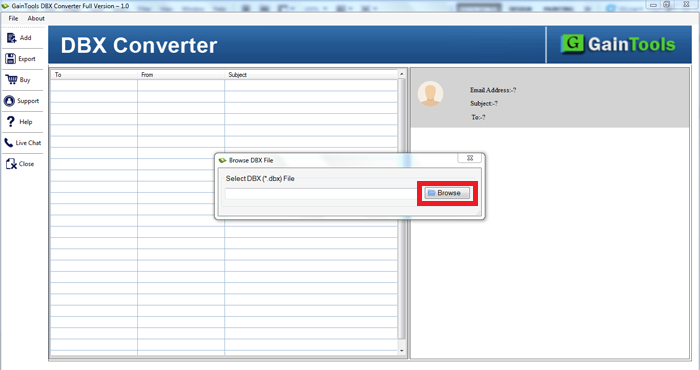
We have provided screenshots and manual guide to assist users to perform the conversion. If still, users face issues they can contact our support executives.
Users have various options to contact us. You can share your queries via email or chat. The team is available 24*7 and provides a complete guide to users to carry out the conversion.
CLIENT REVIEWS
"Exporting emails and attachments from Outlook Express to Mac Mail directly was not possible. I discussed this issue with one of my IT expert friends. He recommended me Betavare Export DBX to EMLX Tool and I exported the data in an easy manner & with full safety having this application."
- Yaritza"Being a novice user when I checked the demo version I liked the simplified interface of this application. Instantly, I took the license keys without wasting much time."
- AlizaFrequently Asked Questions
No, to export Outlook Express emails to Mac Mail, no external tool is required when you have DBX to EMLX Converter with you.
Yes, the conversion of attachments is also supported with DBX emails to EMLX.
Yes, the application supports all Windows platforms including Windows 10, 8, 7, and others.
There is no such restriction. Any large DBX file can be easily exported by the application.
Yes, DBX 2 EMLX Converter is 100% safe and performs the conversion without altering the original files.
SOFTWARE SCREENSHOTS