
EXPORT EML TO PST
Total Ratings: 141 - Average Rating: 4.8 out of 5Rapid conversion of EML files to Outlook PST in batches with Export EML to PST Tool. Along with emails, the conversion of attachments and email components under a safe environment is performed by the application.
- Bulk conversion of EML files to Outlook PST
- Flawless conversion of EML emails to PST in 3 steps
- Get entire EML files preview earlier conversion
- Export selected EML files to PST
- Maintain on-disk folder structure while exporting EML data to PST
- Resultant PST can be opened on all editions of MS Outlook
- Keep formatting and properties of EML mailboxes intact
- Supportive to multiple EML platforms
- Resultant data can be saved to new PST or existing PST
- Designed to install on all Windows platforms
- Guiding interface for easy conversion of EML emails to PST
- Export EML to PST Free Demo for all
- Online Chat facility 24*7 for any questions
ITEMS TO BE EXPORTED BY EML TO PST EXPORTER
With EML 2 PST Exporter, one can effortlessly export any number of EML emails into PST format. The tool does not impose any limit on the size and number of EML files to be exported to PST format. By this conversion, EML emails are easily read on Outlook 2019, 2016, 2013, etc.
Smooth conversion of Email attributes such as subject, date, from, to, cc, bcc, etc. is performed by the application without losing them.
If you an attached file with EML messages that can be easily exported by the software without any damage to it. All types of attachments like PPT, DOC, XLS, PDF, and others are easily exported by the utility.
With this extraordinary EML to Outlook PST Exporter, one has the facility to export EML folders to PST format in a single attempt. Moreover, the hierarchy of EML folders is not at all disturbed by the application throughout the conversion.
Support All MBOX Supported Email Clients
 Windows Live Mail
 The Bat!
 Outlook Express
 eM Client
 Thunderbird
 Entourage
 Apple Mail
 Incredimail
REMARKABLE FEATURES OF EXPORT EML TO PST TOOL
Convert EML to Outlook PST
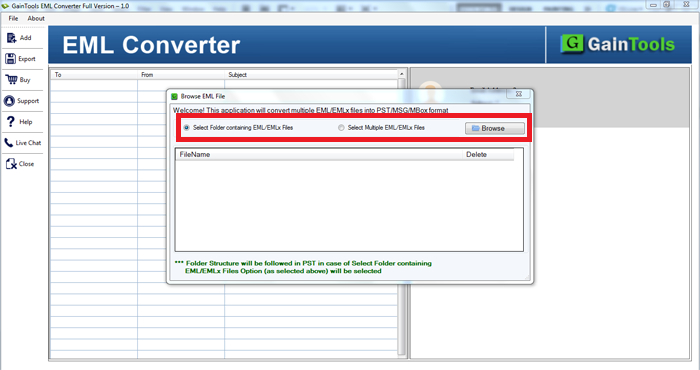
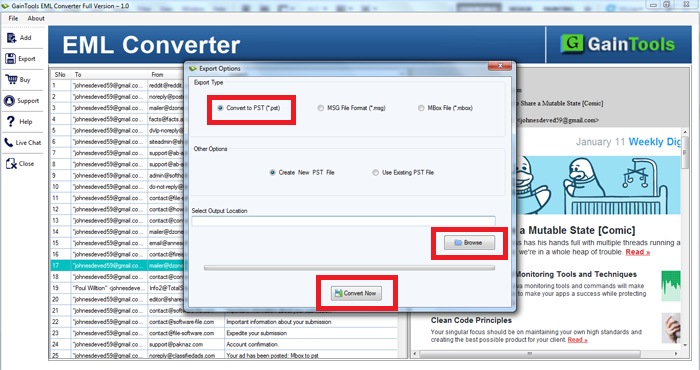
The EML to PST Exporter Tool comes with a simplified interface by which one can easily export EML emails into PST with attachments. The software is safe and quickly perform the conversion without facing any kind of trouble. The guiding interface will help users to easily complete the conversion without any technical expertise. Only 3 simple steps you need to follow - add EML file, preview data, and provide output destination.
Support for multiple email clients
This EML to MS Outlook PST Exporter support conversion of Windows Live Mail, Mozilla Thunderbird, eM client, Outlook Express, DreamMail, Eudora, etc. extracted EML files. No matter from which email client the file is generated, the application comfortably converts EML data to PST format. There is no limit on the number of EML files to migrate with this application.
Preview EML and attachments
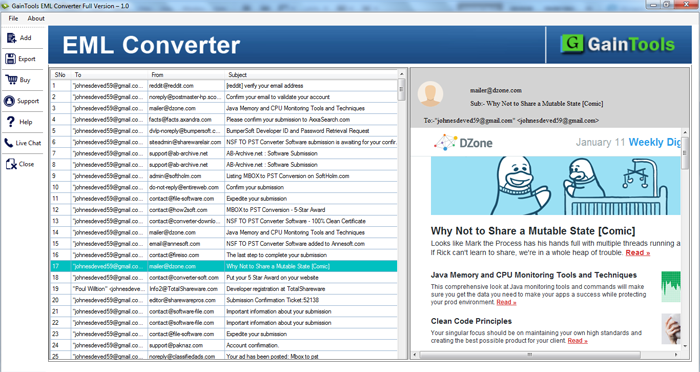
An in-built preview facility is provided by the application. Preview of emails as well as attachments is supported by the application. In the preview section, users can view EML mailboxes prior exporting to PST file format. You can click on a particular email message and view its complete data and this preview feature will help users in performing a better conversion.
Work with all Windows OS
Download this EML to Outlook PST Exporter swiftly on various versions of Windows operating system. The program does not show any compatibility issues with older as well as the latest versions of Windows. You can simply run the program on Windows 10, 8.1, 8, 7, XP, Vista, and others. Throughout the conversion, no file is damaged or corrupted by the application.
Multiple EML files conversion at one go
It is too simple to export multiple EML files into PST format in one time with this brilliant application. Without limiting the number of EML files, the conversion can be easily completed. All healthy EML files get easily converted into PST format with this amazing application. Moreover, the location to save PST file is also specified by users as per their convenience.
No size restrictions
No maximum file size is specified by the application which means every large and oversized EML files are quickly and easily converted. The software comes with enhanced features through which the transfer of EML mailboxes to PST can be easily completed without consuming much time and effort. Due to the size and number of items for conversion, the performance of the application is not at all slow down.
Create Outlook PST in UNICODE format
Always, you will get UNICODE PST file in results by exporting EML files. The resultant PST can be saved into a new PST or to an existing PST. The application can be easily used for both personal and commercial purposes. The converted PST file can be imported to Outlook 2019, 2016, 2013, 2010, 2007, and other versions. By this, EML file can be opened on Outlook easily.
Export independent of MS Outlook
If you don't have MS Outlook installed on your system, you can still perform the conversion of EML mailboxes to PST. The software does not demand installation for Outlook or any other additional email client. You can perform the conversion independently. Moreover, the application smartly manages the conversion in 3 easy steps without altering the original files.
CLIENT REVIEWS
"I was confused to choose a solution that export EML data to PST without losing the formatting of my messages. I came across this Export EML to PST Tool. Less time is taken by the application. Hats off to the team for developing such a friendly application."
- Cortez"With the support of this software, I exported emails from Windows Live Mail to Outlook. I am thankful to the executives and developers of the product for making such a wonderful tool."
- AmaliaFrequently Asked Questions
Yes, the application easily converts EML data to PST without using MS Outlook.
There is no such limit specified by the application. Any number of EML files gets converted to PST.
Yes, we offer free version by which users can test the software performance before invest in EML to PST Converter full version.
No, only healthy EML files get converted by the application. The tool does not consider corrupted EML files.
No, the software is not compatible with Mac OS. It can be installed only on Windows operating systems.
SOFTWARE SCREENSHOTS