
EXPORT EML TO MSG
Total Ratings: 112 - Average Rating: 4.7 out of 5Simplified solution to export EML to MSG and EMLX to MSG without using Outlook. Bulk conversion of EML emails to MSG without alteration to EML properties. The program supports EML files created on Windows Live Mail, Outlook Express, Thunderbird, etc.
- Easy EML to MSG Conversion without Outlook
- Interactive and descriptive wizard
- Bulk conversion of EML database
- Allow conversion of large-size EML files
- Accurate conversion all the time
- Support multiple email clients - Windows Live Mail, Thunderbird, DreamMail, etc.
- Save resultant MSG at any location of your choice
- Preview each EML file before actual conversion
- Preserve EML meta data during the conversion
- Export EML attachments associated with EML emails
- Convert MSG file created on all Outlook editions
- Designed to suit all Windows operating systems
- EML to MSG Converter Free version to judge software performance
ITEMS TO BE CONVERTED USING EML TO MSG EXPORTER
EML messages are easily exported to MSG file format with this smart application. Along with this, the application takes care of email components and formatting such as to, cc, bcc, from, date, time, subject, hyperlinks, font styles, and many more.
If you have attachments with EML messages, these are considered by the application and are comfortably exported from EML file to MSG file format. All type of attachments including documents, audios, videos, etc. are easily exported by the tool.
With EML to Outlook MSG Exporter, one can export a folder of EML 2 MSG format in a single attempt. Without limiting the size and number of items, one can swiftly export EML folder to MSG format. Moreover, the hierarchy of folders is completed retained throughout the conversion.
Support All EML Email Clients Platformss
 Windows Live Mail
 The Bat!
 Outlook Express
 eM Client
 Thunderbird
 Entourage
 Apple Mail
 Incredimail
REMARKABLE FEATURES OF EML TO OUTLOOK MSG EXPORTER
Option for batch conversion
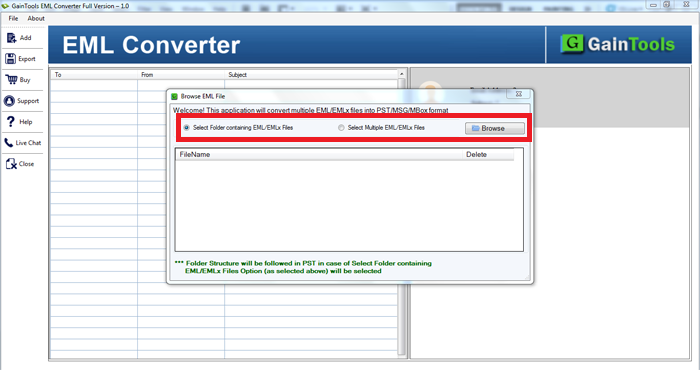
The software comes with dual modes by which you can add EML files to the software panel. If you have a folder of EML, choose folder mode and easily export multiple EML files into MSG format in a single round of conversion.
Apart from this, the software easily export any large EML file to MSG format without damage and corruption to any file.
Detailed preview before export
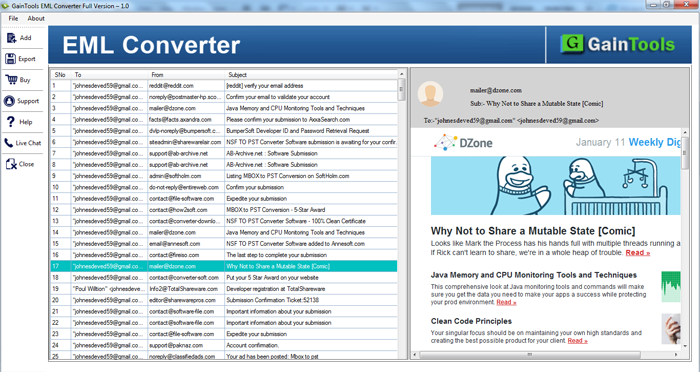
Having this smart application, one can get detailed preview of every EML file before their conversion. Moreover, complete scanning of EML files is done by the tool once they are uploaded on the software panel.
By getting preview, one can check the complete mailbox items before their conversion and can perform the conversion in a smart manner by rechecking the files.
Favorably export MSG of all Outlook versions
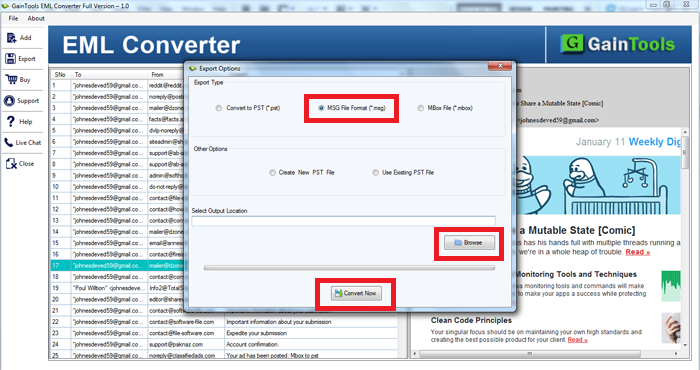
The software allows users to export desired EML messages to MSG format. Moreover, the selection of location to save MSG files is totally in users' hands.
Once you get MSG file from EML file, you have the full freedom to import MSG file to all editions of MS Outlook such as Outlook 2019, 2016, 2013, 2010, 2007, 2003, and others.
Keep attachments embedded
If you have an attached file with EML message, the attached file can be easily exported with emails. There is no harm to the attached file. Without considering the type of attached file like document (.doc, .ppt, .xls, .pdf), audio, video, image, etc. the tool support conversion of these attachments.
The complete email details are comfortably exported by the application without any alterations and damages.
.eml to .msg conversion without Outlook
Export EML to MSG using Outlook is possible but when you don't have Outlook installed on your system and then you want to convert EML file to MSG format, it is really challenging. At that time, this software help you to carry out the conversion of EML messages to MSG format.
After performing the conversion, the resultant MSG file can be readable on all versions of Microsoft Outlook.
Export EML from different platforms
EML file created on various platforms are easily exported by the application. Since EML file is used to store data by Windows Live Mail, Thunderbird, Outlook Express, eM client, DreamMail, and others.
All the healthy EML files are easily exported by the application into MSG file format. Without installing any EML supported email client, the conversion can be easily carried out without any error-message and data loss.
Maintain actual folder structure
The application completely takes care of email properties and email formatting including to, cc, bcc, from, sent, date, time, hyperlinks, font styles, color, and many other details.
Along with this, the hierarchy of EML folders is maintained as it is after the conversion. The software is completely secure and has undergone various tests before introducing it among users.
For Windows users
The software is easily workable on all Windows operating systems including the latest and previous versions. You can effortlessly export EML messages to MSG on Windows 10, 8.1, 8, 7, XP, Vista, and others.
Moreover, the software is compatible with Windows 32bit and 64bit versions. Keeping the already running tasks intact, the conversion on all Windows platforms can be easily performed.
CLIENT REVIEWS
"I was moving from Windows Live Mail to Outlook and exporting important emails from Windows Live Mail to MSG was really tough for me as I am a non-tech user. My friend advised me to try Betavare Export EML to MSG Tool. I am glad to have this tool as the conversion becomes so smooth with it."
- Keyon"This is one of the best tools I came across for exporting EML files to Outlook MSG file format. Its instant processing speed and bulk conversion mode really attracted me towards me."
- YulianaFrequently Asked Questions
No, installing Outlook is not compulsory to convert EML files to Outlook MSG file format.
Yes, the application easily converts multiple EML files into MSG format in one attempt.
Yes, EML files of multiple email clients is supported by the application including Thunderbird, Windows Live Mail, Outlook Express, eM client, and others.
No, the application is designed to suit Windows platforms. You can't install it on Mac OS.
The demo version allows you to get familiar with the application before investing in it. It exports only 10 EML files into MSG file format.
SOFTWARE SCREENSHOTS