
BETAVARE EDB TO PST EXPORTER
Total Ratings: 157 - Average Rating: 4.6 out of 5Tired of seeing similar emails again and again? Get rid of them with BetaVare EDB to PST Exporter in Outlook with just a few clicks, quickly, securely, and without any trouble.
- This is the fastest application to convert EDB data to PST format
- It can simply convert offline & damaged EDB data to PST files
- The user can convert complete mailbox items like email, contacts, calendar, and more
- Users have the option to select and export the required item only
- The user can check the live preview of all their emails and attachments
- Not only the PST format, users can also export in many other formats like MSG, EML, MBOX, HTML, and more.
- It can easily export large EDB files without creating any issues.
- Users don't need to worry because its data integrity is 100% safe.
- It maintains the originality of data after the conversion, also.
- It has features to split the large PST data into a smaller size
- It can be easily operated by a non-technical user
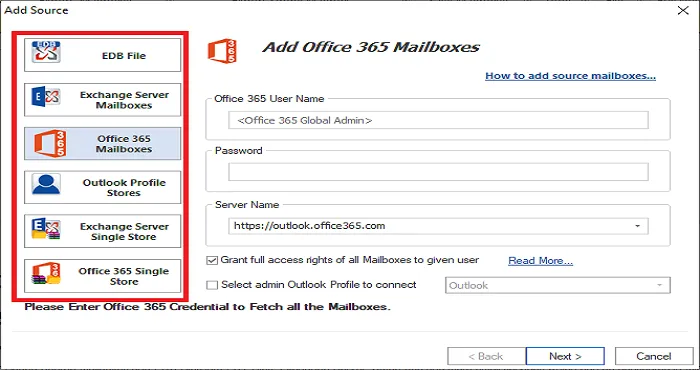
- Migration can be performed directly to Office 365 & Live Exchange
- By a Fast-scanning engine corrupted EDB file can also be recovered.
- It supports all exchange versions, including 2019, 2016, 2013, and more.
Convert Exchange EDB Files to Outlook PST
The EDB to PST Exporter program allows for the safe, clean, and accurate export of email messages contained within an EDB database to PST format. The tool does not alter email content, so the message body, formatting, HTML design, embedded content, timestamps, header values, and sender-receiver properties stay as they once were. There is no loss of data in the conversion process, and easily, emails can be exported selectively.
The tool is useful in circumstances where Exchange Server has a failure of access, corruption, or mounting an error. With an effective scanning engine you may swiftly preview every email regardless of inbox, sent items, drafts, archive, or a user-defined folder.
The most beneficial feature of this converter is that you can easily export only the email items needed with filtering to methods based on date range, subject, email address, or folder. Even large mailboxes convert quickly and stably.
The software accurately exports attachments with the emails. Whether they are PDFs, images, documents, zip files, or linked contracts, email attachments all migrate completely and safely to the chosen format.
Email folders that are stored in the EDB, for example, Inbox, Outbox, Drafts, Deleted Items, Archive, and customer folders, can all be migrated to PST or the chosen format.
This tool offers an intuitive filter that allows exporting specific emails depending on date, subject, or sender/receiver.
The EDB to PST tool retrieves all calendar data and exports it safely into a PST file. All the details captured during this conversion are done exactly as is, no change, all information is captured.
The tool also retrieves every calendar attachment, which includes: business cards, meeting notes, signatures, documents, or any other linked file. All attachments are migrated to the PST/ICS format with a single point of reference exactly as is.
There are several calendar types you can convert with the tool:
- Meetings
- Events
- Appointments
- Reminders
The tool does this with no worry about reminders, as it auto-detects the reminders and also transfers with no issues into PST, leaving behind missed alerts.
The EDB to PST Exporter tool is able to export every single contact of your Exchange EDB mailbox in a perfect PST/VCF format. It appears to retain contact data like: Contact name, nickname, birthday, company name, job title, and probably many email IDs from their contact history.
The tool also allows for the migration of the address fields on each contact's display, including;
- Home Address
- Business Address
- Other Address
And each line of the address is imported correctly, mapped in the associated PST fields.
This tool will convert all the phone numbers for the contact (primary, mobile, business, home, etc.) and the associated fields into PST/VCF format.
The EDB to PST Exporter will extract every element of the task through advanced parsing (subject, reminder, task notes, start date, due date, status, etc.). These appear in the PST file with the same hierarchy and the related metadata.
- Due date
- Start Date
- Reminder
- Status
- Priority
- Subject
All files tied to the task will export into the PST file with the correct structure (documents, images, notes, etc.).
The user-set task reminder will also export with no alterations.
EDB notes items such as short reminders, saved points, notes marked with color, and text memos can all be exported to PST items, with their formatting preserved from the EDB item. The tool also creates a preview of the notes available so the user can select their notes easily.
The tool will export to PST, while keeping the complete EDB folder hierarchy that exists. Custom Folder and Subfolder information, as well as all information saved in Public Folders, will also keep the same hierarchy and organization for any EDB data exported to PST.
Support all the MS Outlook Versions
 Outlook 2019
 Outlook 2016
 Outlook 2013
 Outlook 2010
 Outlook 2007
 Outlook 2003
 Outlook 1997
 Outlook 2000
Descriptive Key Features of EDB to PST Exporter
Converts Offline, Inaccessible & Corrupted EDB Files
It supports of state of the EDB files, whether it is offline, dismounted, in a dirty shutdown state, or even corrupted. The advanced scanning engine deeply scans and analyzes all parts of EDB files and generates clean output. In situations where Exchange crashes and users need urgent data access, this tool makes mailbox recovery possible without a server. Normal converter skips the corrupted data, but this is its scanning algorithm. EDB extracts the deeply locked items like emails, contacts, calendar, etc.
Complete Mailbox Conversion with All Items
Not only emails, but this tool exports the complete EDB mailbox into PST format, like emails, calendar, contacts, notes, tasks, journals, attachments, folders, and public folder items, etc. No data is lost during the conversion process. This is particularly helpful for enterprise-level recovery, where the mailboxes of multiple users need to be restored simultaneously. All the EDB data will easily open in the PST format.
Selective Item & Folder-Based Export
Its selective export option is a powerful feature that provides an option to export the complete mailbox or export specific folders like Inbox, Sent, Drafts, Deleted, Custom folders, etc. It will save time and get rid of unnecessary conversions. Even users have the option to choose a single mail, which is useful in investigation, audit, or selective restore.
Preview Mailbox Items Before Exporting
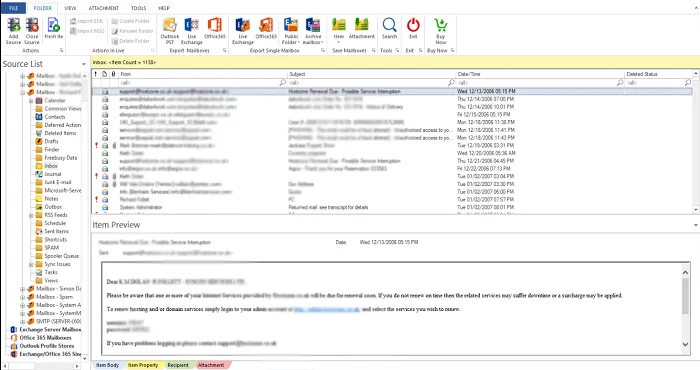
This tool provided a live preview of the folder, emails, attachments, etc. This feature provides the user with an option to ensure that confirm the export items before conversion. All the items extract preview like emails, complete body, HTML formatting, inline images, meta-properties, sender details, and timestamps. This function is perfect for forensic teams and Exchange admins.
Support Multiple Output Formats
This tool supports users to export multiple file formats like PST, MSG, EML, MBOX, HTML, Office 365, and Live Exchange, Etc. This flexibility helps users to shift their data into different platforms. Example MBOX is for Apple Mail, EML is for Windows Mail, and HTML is for web archives.
Split PST for Large Mailboxes
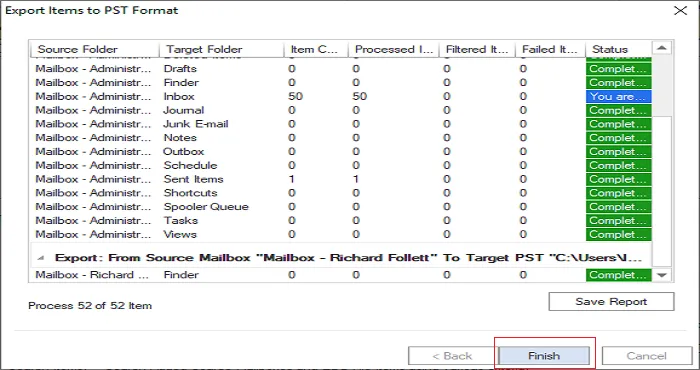
EDB generates a large PST file, like 20GB and to avoid a large PST file corruption and this offers a split option. The user can define the size 2GB, 5GB, 10GB, and more. By this feature, the performance of Outlook will be enhanced. It is the most stable feature for the admins.
Maintains Original Email Formatting & Folder Structure
The formatting will remain 100% saved after the conversion, also like all the bold, italic, HTML, design, tables, signatures, attachments, structure, and headers. Everything displays as it was in its original format. The folder hierarchy is also maintained, making the PST display exactly like an Exchange database. This feature is perfect for user experience and clarity.
No Size Limitation Supports Very Large EDB Files
It smoothly processes large EDB files, like 100GB, 300GB, and even 1TB EDB files can be easily processed. Advanced memory optimization ensures that the software will not hang. A large organization where multiple years of databases are stored in an EDB file format, these capabilities are necessary for them.
Direct Export to Office 365 & Live Exchange
Premium features allow you to export mailboxes from EDB directly to Office 365, instead of requiring a PST to be generated first. This is a real lifesaver when you are in migration projects. You will be able to choose the specific mailboxes you want, and the tool will map and upload the info directly. This feature is available for Live Exchange as well, fully supported up to Exchange 2019/2016/2013.
Fastest Conversion Speed with Optimized Engine
Both scanning and conversion utilize engines optimized for speed. Even the largest of mailboxes loads in milliseconds. The speed is beneficial for server-down scenarios where you must act quickly to recover messages. The tool utilizes multi-threaded processing to process multiple mailboxes in parallel.
Zero Data Loss Guarantee + 100% Secure Process
During the conversion process, no data is modified, delayed, damaged, or altered. The metadata, which is typically To/From, CC, BCC, Reply-To, timestamps, and attachments, remains intact. The software works offline, so no risk of a data breach arises. This is a perfectly secure method for sensitive organizational data.
Simple, Clean & User-Friendly Interface
The application has a user interface so intuitive that even non-technical users can utilize it without any prior training. The software guides users through each step of the process, which consists of a simple Load → Preview→ Select→ Convert process. Users are able to convert documents with one click, which significantly reduces the IT administrator's workload.
CLIENT REVIEWS
"Our Exchange server had crashed and was not able to open. But this tool recovers all the information in just 30 minutes. This tool helps to recover all my data in just a single click."
- Susan J. Graves"The interface of this tool is very simple; any type of user can easily use it. It smoothly converts a large EDB file of around 180GB into PST format."
- Oliver M. SwansonFrequently Asked Questions
Yes, this tool recovers all the corrupted EDB files
SOFTWARE SCREENSHOTS