
FREE PST VIEWER
Total Ratings: 140 - Average Rating: 4.8 out of 5Open and preview complete Outlook mailboxes without installing Microsoft Outlook. Betavare PST Viewer is a completely free tool that will open active, archived and password-protected PST files.
- Enable users to open and view PST file without Outlook
- Preview email messages, contacts, calendars, tasks, journals, etc.
- Open PST file of ANSI & UNICODE type
- Deep scanning of Outlook data files
- Wide support to Outlook versions - Outlook 2019, 2016, 2013, 2010, 2007
- Selected PST items viewing
- Open attachments of Outlook file
- Open any number of PST files free of cost
- Easily view any large size Outlook PST file
- Easily open PST file of password-protected nature
- Totally free, costs nothing to your pocket
- Preserve Outlook email properties - to, cc, bcc, from, sent, etc.
- 100% harmless and complete PST file viewing
Items to be viewed using PST Viewer Freeware
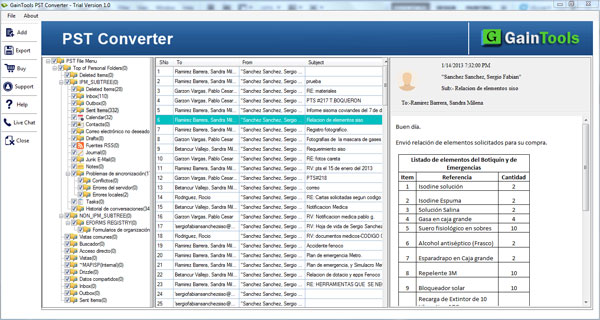
Outlook emails all folders are properly viewed by PST Viewer freeware. The tool generates view of complete view of Outlook email messages in a structured manner. With email attributes like to, cc, bcc, from, sent, date, time, etc. Outlook mailbox items can be viewed by the application.
The tool display respective attachments like images, audios, videos, documents, etc. corresponding to email messages. One can easily play audio/video and open image within the software interface.
The application shows complete preview of Outlook folders such as Inbox, Outbox, Sent Items, Drafts, Tasks, Notes, etc. without any problems. Users can choose the desired folders and view their data.
Outlook calendar entire details such as location, subject, end time, start time, etc. are properly opened by the software without any confusion.
The application supports viewing of calendar attachments as well which includes business cards, signatures, files, etc.
All calendar types like tasks, events, meetings, appointments, etc. are easily readable by Outlook Reader Tool.
The complete contacts of Outlook file are opened by the application. It includes name, nick name, birth date, spouse name, & other contact details.
Address details like home, business, and others are completed viewed by the application.
All the phone numbers like home, business, and other numbers are viewed contained in PST file with this Outlook Viewer Tool.
Users can view complete Outlook mailbox folders without any troubles. You can view a particular folder of Outlook or all folders as per your requirement.
With PST Viewer Tool, one can view the entire notes in an easy manner.
One can view journals of Outlook. It includes items like subject, category, attachments, etc.
Support all the MS Outlook Versions
 Outlook 2019
 Outlook 2016
 Outlook 2013
 Outlook 2010
 Outlook 2007
 Outlook 2003
 Outlook 1997
 Outlook 2000
Software features in details
Open PST file without Outlook
If you don't have MS Outlook with you due to any reasons and you want to view the content of PST file. At first sight, it seems impossible but having this Outlook File Viewer Tool, one can easily open PST file without installing MS Outlook.
The installation of Outlook is not mandatory with this application. Only you need to fulfill the system basic requirements and you can effortlessly view Outlook mailboxes items without Outlook using PST File Viewer Tool.
Complete PST data scanning
PST File Opener Tool once downloaded by the users and the PST file is added on the software panel, the tool starts the scanning process. The scanning feature is in-built in the software. When the PST file is scanned, you can get a detailed view of PST items.
One by one, users can open multiple PST files of different sizes in a flawless manner. There is no such limit specified on the number of PST files to open with this application.
No limitation on file size
Be a small size PST or large PST file you have, the tool easily open any large PST file without any issues. Due to the size of Outlook mailboxes, software processing does not change or slow down.
Once the PST file is added to the software panel, the tool quickly provides a view of complete Outlook data in a structured manner without affecting the original content of Outlook PST file.
Open all type PST files
All types of PST files are supported by Outlook Viewer Tool. The software supports reading of archive as well as active PST files. Apart from this, ANSI PST and UNICODE PST both PST types are supported by the application.
Additionally, you can view PST file of password-protected nature by providing the correct password of Outlook PST file. With this application, you can normally add the files and view them.
Free of cost application
The most important thing about Outlook Viewer Tool is that it is absolutely free for all. You don't need to spend a single penny on this software. You can avail complete benefits of this software free of cost.
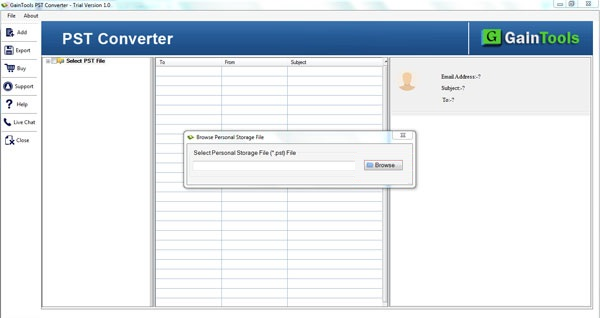
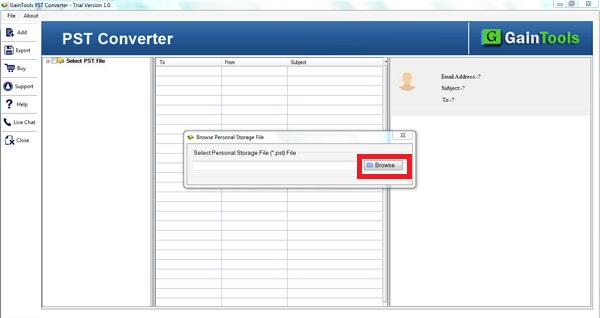
What you need to do is to download and install it on your Windows systems. For knowing the complete process to view PST file, you can take help of screenshots and can contact our technical support team 24*7.
Wide support to Outlook & Windows
PST File Viewer Tool provides complete support to the latest Outlook and Windows versions. The tool easily opens PST file of all Outlook versions like Outlook 2019, 2016, 2013, 2010, 2007, 2003, and many more.
Plus, the software can be comfortably downloaded on all Windows platforms without creating any trouble. Freely install PST Viewer Tool on Windows 10, 8.1, 8, 7, XP, Vista, and others.
View complete Outlook data
PST Reader Tool comfortably view complete Outlook mailboxes. Along with email components and formatting, users can view Outlook email messages, contacts, calendars, tasks, notes, journals, and many more.
One can view complete details contained by PST file using this freeware. Without manipulating the original data files, one can easily read data of entire PST file.
Retain original file quality
The originality of PST files can't be changed by the application. You can get complete database viewing in a hierarchical manner. The entire folder hierarchy is maintained as it is by the application.
There is no harm to the genuine file and its quality. You can view desired items from the completed PST file without Outlook and without any harm to the actual files.
CLIENT REVIEWS
"I was using Gmail and suddenly I got 10 PST files from a client. I was in great confusion how to open these PST files as I don’t have Outlook with me. Luckily, I met with Betavare PST File Viewer Tool and is capable to view PST file without MS Outlook."
- Abbigail"Firstly, I would like to thank the developers for such a simplified application. Being a non-tech user, I effortlessly opened large PST files with this application without any difficulties."
- NovaFrequently Asked Questions
Yes, the application supports all the latest and older versions of Outlook and works well with them.
No, the software opens only healthy PST files. You can't open a corrupt PST with this application.
Yes, the tool easily open PST emails and attachments both.
No, PST File Viewer is completely free. All you need to do is to just download and install in on your Windows system.
The software is 100% safe and does not affect your files.
SOFTWARE SCREENSHOTS