
EXPORT MBOX TO EML
Total Ratings: 159 - Average Rating: 4.8 out of 5Swift conversion of MBOX data into EML format with Export MBOX to EML Tool. The software supports easy transfer Thunderbird, Eudora, Postbox, Google Takeout MBOX to .eml files without no data loss.
- Batch MBOX mailbox migration to EML format
- Convert MBOX file of more than 20+ email clients
- Maintain folder mailbox tree
- Selective file conversion facility
- Preview entire MBOX database
- Free trial available for all users
- Export email elements such as date, from, to, subject, attachments, etc.
- Compatible with all versions of Windows OS
- Export EML file from MBOX file of large size
- 24/7 customer support
- Provides 100% accuracy in conversion
- Independent application
- Save EML file locally on user system
ITEMS TO BE EXPORTED USING MBOX TO EML EXPORTER
Email messages of Thunderbird, Spicebird, Netscape, Eudora, Postbox, and other MBOX supported emails. Without considering the size of mailbox, one can easily export MBOX to .eml file format without any trouble and file corruption.
Along with emails, the email components are safely exported from MBOX data to EML file format. For every MBOX message file, a single EML file is created considering date, time, to, cc, bcc, etc. in it exported from MBOX file.
The attached files are exported with email messages. With MBOX 2 EML Exporter, all images, videos, audios, etc. are effortlessly exported to EML from MBOX file.
There is no need to export MBOX email client complete database. If you want to export filtered items, you can easily do it with MBOX to Email Converter Tool.
With this amazing application, one can easily pick folder of MBOX and export it into EML file format. Without disturbing the hierarchy of folders and subfolders, the conversion can be easily completed.
Support all MBOX Client Platforms
 Thunderbird
 Entourage
 Apple Mail
 KMail
KMail Claws Mail
 Postbox
 Sylpheed
 SeaMonkey
Detailed features of MBOX to EML Exporter
Easy handling utility
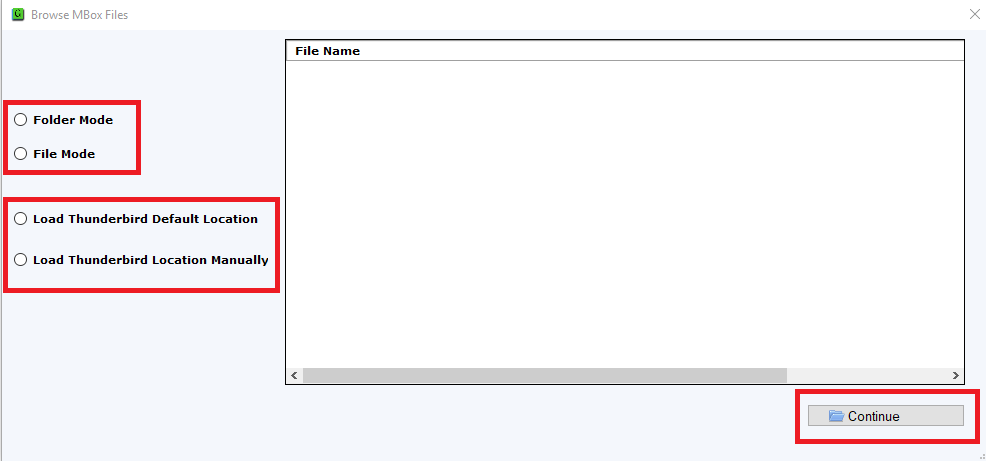
MBOX 2 EML Converter has a simplified interface which is very simple to understand by all. Without any issues, the steps of MBOX data to EML conversion can be carried out by all.
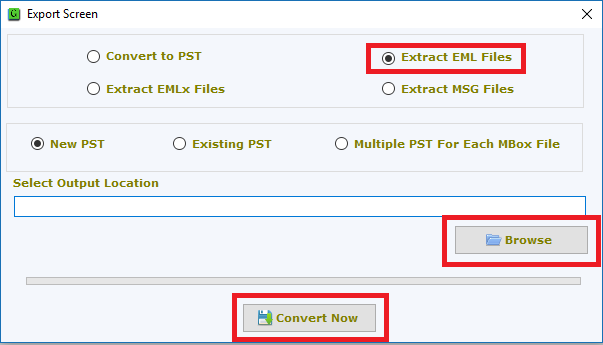
You will get the conversion of MBOX files to EML in 3 simple steps which includes adding MBOX files, preview and choice of output destination path. Once you execute these steps, you are ready to achieve EML file in a few seconds without any delays.
Batch convert MBOX file to EML
The software is a powerful option for users to export multiple MBOX files to EML file format in a short span of time. You can easily load more than single MBOX file and export them comfortably to EML file format.
You don't have to undergo the same process for conversion of multiple MBOX files. Without losing a single bit of information, you can easily perform batch migration.
100% verified solution
The application is 100% authentic. No complaints of data loss and corruption are there with this smart tool. One can easily export MBOX file to Email files (.eml) without considering the size and platform of MBOX files.
All the time, users will get 100% accuracy in conversion. Not a single element is modified meanwhile the conversion of MBOX to Email (.eml). Users will get seamless and unaltered conversion without any trouble.
Maintain metadata and folder structure
The software is developed with various advantageous features. It has the capability to hold the original mailbox folder and subfolder hierarchy in its original form.
In addition to this, the software preserves the key elements like to, cc, bcc, date, time, images, hyperlinks, signature, attachments, etc. of emails and does not modify them throughout the conversion process.
Thunderbird to Windows Live Mail Conversion
If you are using Thunderbird, you can directly migrate emails of Thunderbird to Windows Live Mail with the help of this smart application. All you have to do is to load Thunderbird mailbox items to the software panel.
In the results, you will get EML file that you can easily import to Windows Live Mail and other EML supporting email applications like Outlook Express, eM Client, Dream Mail, etc.
Extract EML from MBOX independently
MBOX 2 EML Exporter works independently. Without installation of any additional program, the conversion of MBOX files into EML format can be achieved. You just need to put MBOX files on the software panel and follow the instructions guided by the tool itself.
Easy extraction of emails and attachments to EML from MBOX file is carried out by the software. The tool will never damage any of your email items or content meanwhile the migration.
Highly compatible tool
The MBOX File to EML Converter is suitable to export MBOX emails to EML file format on all Windows platforms. MBOX file of more than 20+ email clients is exported to EML format which includes Thunderbird, Spicebird, Netscape, Google Takeout, The Bat, Postbox, KMail, Eudora, Entourage, etc.
Moreover, the software runs easily on all versions of Windows like Windows XP, Vista, 7, 8, 10, and others without any issues.
Display entire database prior conversion
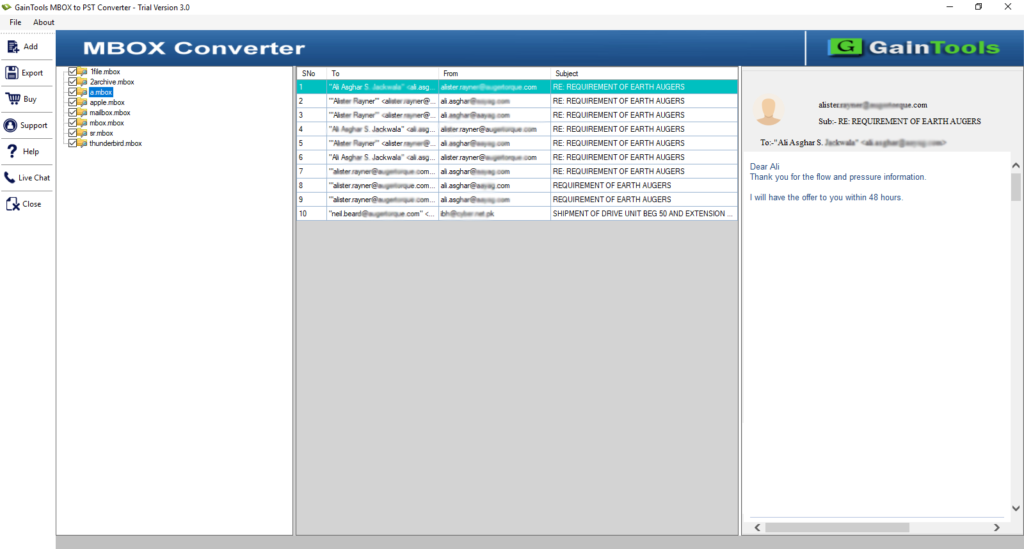
Scan and preview are two inbuilt features of MBOX File to EML Exporter. Once MBOX file or folders are loaded on the software panel, the entire database is scanned by the tool and then a preview of complete mailbox items is displayed.
Preview feature is really helpful for users to check out the files before the conversion. Moreover, users can choose desired items from the database to export to EML file from MBOX.
CLIENT REVIEWS
"I have switched from Thunderbird to Windows Live Mail and to migrate the mailbox items, I used Export MBOX to EML Tool. All the emails and attachments are safely exported by the application without corrupting any file."
- Bridger"I analyzed the demo edition first and really impressed and surprised with the results. Then, I upgrade to the licensed edition and extracted MBOX files to EML format in batch. Thanks team!"
- YamilethFrequently Asked Questions
SOFTWARE SCREENSHOTS