
EXPORT MSG TO EMLX
Total Ratings: 156 - Average Rating: 4.7 out of 5Tool to bulk export MSG to EMLX to access Outlook single mail to Apple Mail. The application easily export MSG emails to Mac Mail EMLX with attachments and email properties. Free MSG to EMLX Tool availability to assess the performance of it.
- Instantly export MSG files to EMLX
- Export Outlook single mail i.e. MSG to Apple Mail
- Export attachments as well with MSG emails
- Outlook installation is not mandatory
- Retains original folder structure
- Single panel interface for easy understanding
- Bulk export of MSG files to Mac Mail EMLX
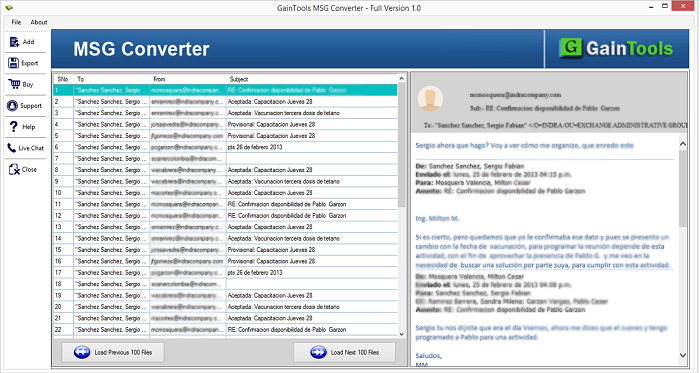
- Display entire MSG content before conversion
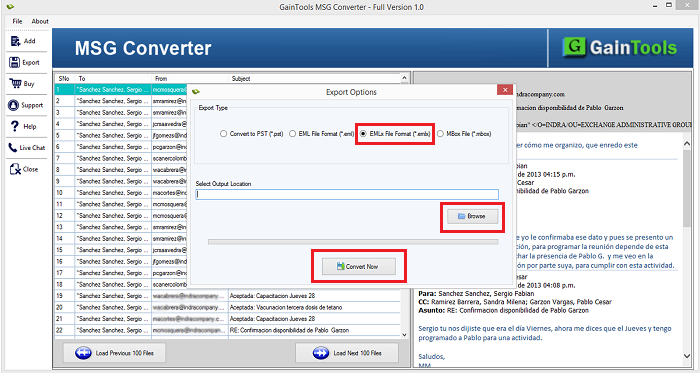
- Save EMLX file at any output location
- No change to actual MSG files
- Deal with all editions of Outlook - Outlook 2019, 2016, 2013, 2010, & others
- Both 64bit and 32bit Windows versions are supported
- Export nominated MSG files to Mac Mail
ITEMS TO BE EXPORTED USING MSG TO APPLE MAIL EXPORTER
MSG email messages are exported to Apple Mail EMLX file format. Regardless of file size, one can comfortably export MSG files to EMLX file format without misplacing a single element. 100% assured conversion is performed by the tool.
With email messages, all the email components are exported by the tool including -
- To
- Cc
- Bcc
- From
- Sent
- Time
- Subject
Every type of MSG attachment is exported by the tool. The application easily export DOC, PPT, PDF, XLS, and others while exporting MSG emails to Apple Mail EMLX file format.
One can easily export MSG folder to EMLX in one time with this utility. All the folders of MSG like Inbox, Outbox, Sent, Drafts items, junk emails, deleted items, etc. are easily exported by the application with full accuracy.
Support all MSG Source Platforms
 Outlook 2019
 Outlook 2016
 Outlook 2013
 Outlook 2010
 Outlook 2007
 Outlook 2003
 Outlook 1997
 Outlook 2000
Detailed features of MSG to Apple Mail Exporter
Quick and safe conversion
Export MSG to EMLX Tool offers instant conversion of MSG emails to EMLX file format. In just 4 simple steps, the migration of MSG files to Apple Mail EMLX gets completed without misplacing a single file.
Not a single file is misplaced throughout the conversion task. The tool easily exports Inbox, Outbox, Sent, Drafts, Junk email, deleted items, etc. emails from MSG to Apple Mail EMLX file format. After that Outlook MSG files are accessed on Mac platforms.
Supportable to all Windows
MSG 2 EMLX Exporter easily supports all versions of Windows operating systems including the latest and older versions of Windows. You can comfortably export MSG emails to EMLX on Windows 10, 8.1, 8, 7, XP, Vista, and others.
Along with this, 64bit and 32bit editions of Windows are compatible with this tool. Without disturbing the already running tasks, the conversion can be comfortably completed on all Windows platforms.
Attachments conversion as well
One can easily export attached files with MSG emails. All types of MSG attachments like DOC, XLS, PDF, PPT, etc. are easily exported by the app. Along with this, MSG emails with complete details are exported smoothly.
No matter with the size of attachment, the application easily export it without any hurdles and file corruption throughout the conversion task.
Bulk MSG to EMLX conversion
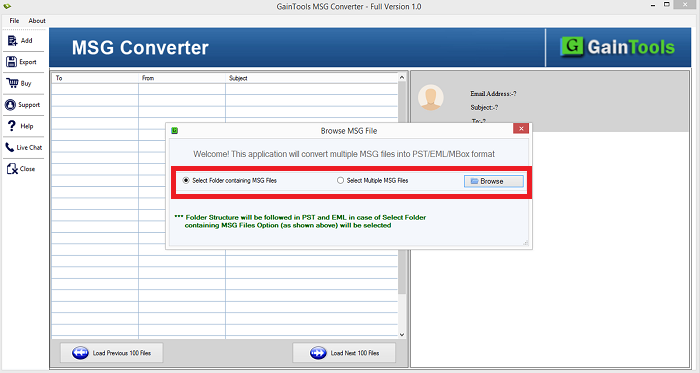
The application offers two modes - file and folder to export MSG files to Apple Mail EMLX. With the Folder mode, one can export multiple MSG files to EMLX at one time. There is no limit specified by the tool on the size and number of items.
Once you have the license keys with you, you have full freedom to export unlimited MSG data to EMLX file format.
Export MSG file without Outlook to EMLX
Installation of Microsoft Outlook is not compulsory to export MSG to Apple Mail. The application is sufficient enough to export MSG files to Mac Mail without Outlook. However, the tool supports all versions of MS Outlook. You can easily export MSG file extracted from every version of MS Outlook.
Outlook versions - Support Outlook 2019, Outlook 2016, 2013, 2010, 2007, 2003, and others.
Friendly interface
With the friendly interface, it is too easy to follow the steps of conversion with this tool. Both professionals and novice users can easily operate the app without facing any difficulty.
The guiding interface helps users to complete the migration without getting any kind of confusion. To clear all your doubts, you can contact our support team which is available 24*7. All your pre and post sales queries are resolved by the team.
Preserve email details
MSG 2 EMLX Tool preserves the complete email details like to, cc, bcc, from, date, time, hyperlinks, inline images, font size, font styles, background, and many more. Along with this, the hierarchy of MSG folders is completely retained throughout the conversion.
One can preview every detail of MSG file before finalizing the conversion. This will help users to check the files before finalizing the conversion.
Save resultant file at desired location
It is a highly effective program which offers users to export desired MSG files to Apple Mail email client. All healthy, archived and password-locked MSG files are easily converted by the application.
After that, the resultant EMLX file can be saved to any path of your choice. Later on, users can access the output file on Mac OS all versions without creating any trouble. Users can create a new folder to save the output file.
CLIENT REVIEWS
"I am very satisfied with this amazing application. I must say this is a marvelous tool that flawlessly exported my Outlook MSG files to EMLX file format."
- Priscilla"The application helped me to export MSG files to Mac Mail email client. Without any file damage, the migration of emails with attachments is performed by the tool under a safe environment. Moreover, Outlook was not demanded to complete this migration."
- KassidyFrequently Asked Questions
SOFTWARE SCREENSHOTS