EXPORT OLM TO MSG
Total Ratings: 119 - Average Rating: 4.8 out of 5Easily migrate Mac Outlook emails to MSG file format using Export OLM to MSG Tool. The program safely exports OLM emails to MSG with attachments in the absence of Microsoft Outlook.
- Rapid export of OLM file to MSG
- No need to install MS Outlook
- Deal with all Mac Outlook versions - 2019, 2016, & 2011
- Import resultant MSG to Windows Outlook 2019, 2016, 2010, 2007, etc.
- 100% safe email migration tool
- No modification and omission to original files
- Include attachments when exporting Mac Outlook emails to MSG
- Scan and preview OLM file
- Preserve OLM folder structure & email formatting
- Download easily on all Windows platforms
- Simplified interface for hassle-free conversion
- 24*7 customer handling team
- Nominated OLM items migration without any issues
Items to be exported using OLM to MSG Exporter
All Mac Outlook emails are safely exported to MSG file format. Irrespective of OLM file size, the conversion of email messages from Mac Outlook all folders like Inbox, Outbox, Drafts, Deleted Items, Junk emails, etc. to MSG format is performed by the tool.
Email components are also exported by the tool including -
- To
- Cc
- Bcc
- From
- Sent/Received date
- Email addresses
- Subject
The tool considers email attachments while exporting OLM emails to MSG file format. The tool exports DOC, PDF, XLS, PDF, PPT, audio, images, and others with Mac Outlook emails. Not a single attachment is lost throughout the migration.
Support all the MS Outlook Versions
 Outlook 2019
 Outlook 2016
 Outlook 2013
 Outlook 2010
 Outlook 2007
 Outlook 2003
 Outlook 1997
 Outlook 2000
Detailed features of Mac Outlook to MSG Exporter
Access Mac Outlook file to Outlook MSG in Windows
If you are using Mac Outlook and want to access Mac Outlook files on Windows, then you need to export OLM file to MSG file format which can be easily completed using Betavare OLM to MSG Exporter.
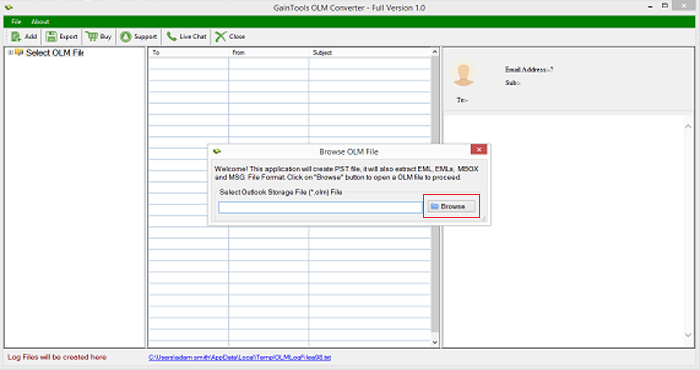
This program offers just a few simple steps to accomplish the migration. You need to add OLM file, preview it, select items for conversion and provide an output destination to save resultant MSG files.
Export emails complete details
The application export OLM emails to MSG file format along with attachments. If you have attached files with OLM messages, all these are safely exported by the tool. Moreover, the email headers such as to, cc, bcc, from, subject, date, time, etc. are preserved throughout the migration.
Moreover, the tool keeps the email formatting (hyperlinks, font style, font size, images, etc.) intact meanwhile the conversion. No loss and misplacement of a single element is there.
Select required destination path
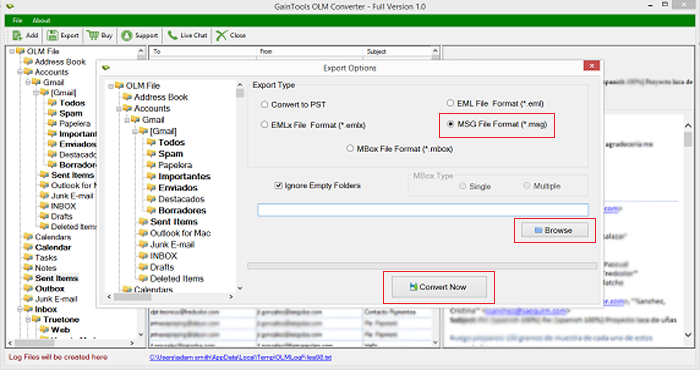
If you want to easily access and manage the output MSG file then the software provides you an option to choose the required destination path. You can simply provide output destination path of your choice without any trouble.
For any queries, you can connect to our support team which is available all the time to solve user's queries without any time wastage.
Preserve OLM internal folder series
You will find the folder structure in resultant MSG file same as in source OLM file. Export OLM to MSG Tool completely keeps the folder hierarchy same after the migration. All the OLM file details are safely retained.
Additionally, you will get a log report in the end once the conversion process is finished. This report shows all the details of conversion.
Preview and scan OLM file
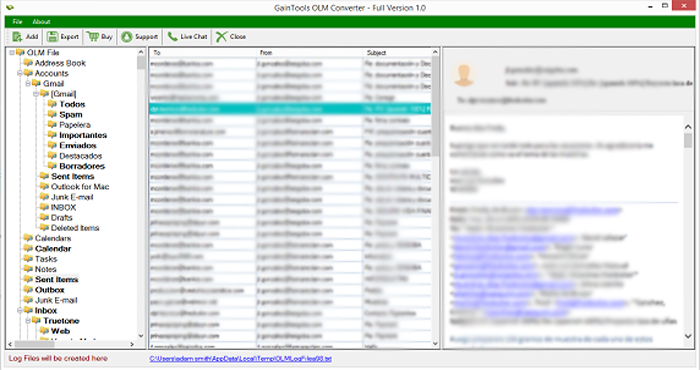
Scan and preview are two in-built features of this software. Once you add OLM file, it is completely scanned by the tool and then you will get OLM file displayed on the software panel. The entire subfolders of OLM are displayed in a hierarchical order.
In preview, you can see the folders which are empty and using 'ignore empty folders' option, you can remove blank folders from the data and export only desired items from Mac Outlook to MSG file format.
Support Outlook & Windows
Both Mac Outlook and Windows Outlook all versions are supported by the program. The application supports the latest and older versions of Outlook for Mac and Outlook for Windows.
Mac Outlook - Export OLM file created in Mac Outlook 2011, 2016, and
2019.
Windows Outlook - Import MSG file on Outlook 2003, 2010, 2013, 2016, and
2019.
Available for all Windows platforms
The software can be simply downloaded on Windows platforms. You can run the software on previous and latest editions of Windows operating system including Windows 10, 8.1, 8, 7, XP, Vista, and others.
The application does not show any issues in downloading on both Windows 64bit and 32bit editions. Although, the tasks other than conversion running in the background are not interrupted by the utility.
Export OLM to MSG without any support
You can export Outlook for Mac to MSG file without taking help from any external tool. The conversion does not demand installation of Microsoft Outlook and can be completed without installing Outlook in the system.
Only system basic requirements should be fulfilled to perform the conversion and you can easily export Mac Outlook files to MSG file format in a short time period without any delays and confusion.
CLIENT REVIEWS
"I got OLM file from my colleague and I was using MS Outlook 2016 for Windows. To read OLM file on Outlook 2016, my friend recommended me Betavare Export OLM to MSG Tool and it has swiftly exported OLM file to MSG file format."
- Jayleen"Instant conversion speed and smart UI of this software helped me to carry out the conversion smoothly. I would love to rate this tool 4.9 stars out of 5."
- JulissaFrequently Asked Questions
Yes, the application exports OLM file created in Mac Outlook 2019, 2016, and 2011.
A single OLM file is converted to MSG file format in one round of conversion. However, the size of OLM file does not matter.
No, the application can be installed only on Windows platforms including Windows 10, 8, 7, and others.
Yes, by exporting OLM file to MSG file format. You can import the resultant MSG to Outlook 2019, 2016, 2010, 2007, and others.
Yes, the program easily exports password-protected Mac Outlook file to MSG file format without any trouble.
SOFTWARE SCREENSHOTS