
EXPORT OLM TO PST
Total Ratings: 167 - Average Rating: 4.7 out of 5Export Mac Outlook files to Windows Outlook with Export OLM to PST Tool. The program offers instant conversion of Mac Outlook to Outlook for Windows. Every large OLM file is exported to PST file format in a few clicks.
- Generate instant preview of OLM database
- Export emails, contacts, notes, calendars, journals, etc.
- Effectively export Mac Outlook emails with attachments
- Does not pose any size limitation
- No Outlook installation to export Mac OLM to PST
- Support Mac Outlook 2019, 2016, and 2011
- Supports Windows Outlook 2019, 2016, 2013, 2010, and 2007
- Folder hierarchy completely maintained
- Meta properties and formatting completely maintained
- Simple and friendly interface
- Free OLM to PST Converter for assessing the tool performance
- Free preview of OLM mailboxes
- Easy downloading on all Windows platforms
Items to be exported using Export OLM to PST Tool
With the help of this Export OLM to PST Tool, one can smoothly export email messages from Mac Outlook to Windows Outlook. The application includes to, cc, bcc, from, sent, hyperlinks, signatures, etc. throughout the conversion.
The utility exports the attachments that are associated with email messages. All the attached files are successfully exported by the application.
Supported attachments types
- Business cards
- Calendars
- Signature
All the folders from Mac Outlook such as Inbox, Outbox, Drafts, deleted items, sent items, calendars, tasks, notes, etc. are easily exported to Windows Outlook PST file format.
One can comfortably export calendar details including subject, location, start time, end time, etc. All the calendar appointments, recurring appointments, meeting requests, etc. are safely exported by the tool.
All the calendar attachments are safely exported from Outlook for Mac to Outlook for Windows. Every large attachment is successfully exported by the application.
Calendar Types
- Events
- Appointment slots
- Meetings
- Tasks
This application easily exports appointment reminder settings also without any trouble. This is one of the remarkable features of this app.
All the contacts are safely exported from Mac Outlook to Windows Outlook. These include first name, last name, birth date, nickname, and many more. The entire contact details are exported by the utility without any losses.
No matter what contact you have added, i.e. primary, home, and business number, etc. All these phone numbers are easily exported by the tool.
- Primary number
- Home number
- Business number
OLM to PST Exporter efficiently export all address fields including home, business, and other addresses.
- Home address
- Business address
- Other address
The tool easily migrate task items such as subject, start date, status, due date, priority, reminder, owener information, and others without any alterations.
- Subject
- Start Date
- Status
- Due date
- Priority
- Reminder
- Owner info.
The application allows exporting attachments without any manipulations.
All the reminders set by users are comfortably exported by the application.
While exporting Notes data associated with OLM file, the tool exports the complete Notes mailbox to the resultant file format.
The application exports the complete data of all email profiles configured into Mac Outlook. With the help of this application, one can get rid of all worries as the tool completely takes care of all elements. It properly maintains the folder and sub-folder hierarchy throughout the conversion. By keeping the original data intact and without any losses, the conversion of OLM internal folders is carried out in PST file format.
Support all the MS Outlook Versions
 Outlook 2019
 Outlook 2016
 Outlook 2013
 Outlook 2010
 Outlook 2007
 Outlook 2003
 Outlook 1997
 Outlook 2000
Key features of Mac Outlook to Windows Outlook Exporter
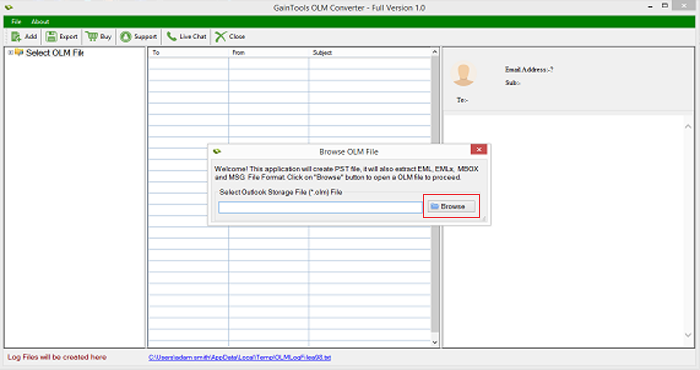
Comfortable wizard
The program offers a comfortable wizard which makes the tool easy to handle by all. Due to its simple wizard, both technical and tyro users can understand the complete working process of the program.
With the guiding interface, the tool seems to be familiar for users. Moreover, all user queries are settled down by our support team which is available 24*7 and provides instant answers to user queries.
Export complete OLM data
The tool offers conversion of complete mailboxes of OLM file including email messages, contacts, notes, calendars, journals, events, tasks, and many more. All the data of Mac Outlook file are safely exported to Windows Outlook.
The software does not demand installation of Microsoft Outlook to complete the conversion. It is possible to export the data without the installation of Outlook email client.
Free preview of OLM mailboxes
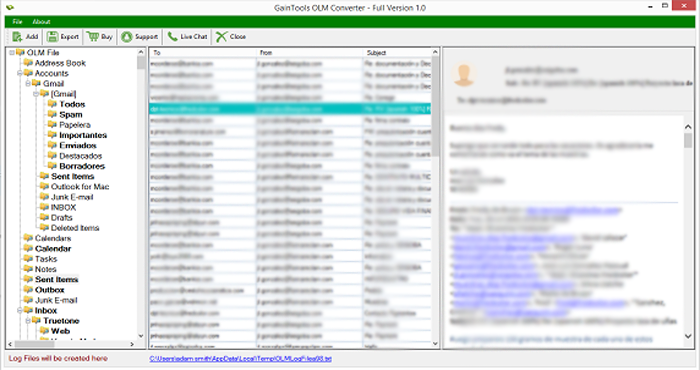
Once OLM file is added on the software panel, the application scans every item of OLM file and then a preview of OLM complete items is provided by the software. You will see all the internal folders on the left panel.
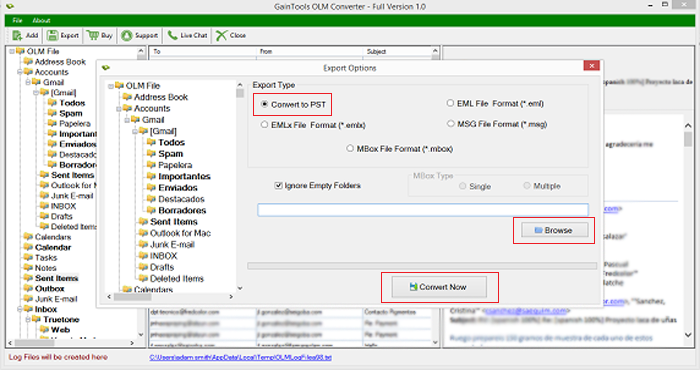
After that, users can export desired folders from Outlook for Mac to Outlook for Windows. A log report of conversion results is generated by the tool after the conversion.
Supports Mac Outlook & Windows Outlook
All editions of Mac Outlook and Windows Outlook are well supported by the program. The program does not show any compatibility issues with any edition of Outlook.
Mac Outlook – Export Mac Outlook 2019, 2016, and 2011 OLM file.
Windows Outlook – Access resultant PST file to all versions of Outlook like
Outlook 2019, 2016, 2013, 2010, 2007, 2003, and others.
Originality of data maintained
The application takes care of complete OLM email elements including email attributes and email formatting including to, cc, bcc, from, sent, date, from, hyperlinks, time, inline images, font styles, etc.
Not a single element is misplaced throughout the conversion process. All the details of OLM file are safely exported to PST file format without any losses. The application ensures 100% safety to content of files.
Freeware option for all
The program comes in two versions - demo and licensed. With the demo version, users can analyze the complete working of this application and go through its functions before taking its license.
The demo edition works the same as the complete version however maximum 10 files per folder of OLM are exported to PST file format. After analyzing the tool, users can apply for the licensed edition (home, business, and enterprise) as per their requirements.
No file size limitations
Every large OLM file is safely exported to PST file format by the application. The app does not come with any file size limits. You have the full freedom to export any over-sized OLM file to Outlook PST format.
The size of OLM file does not affect the working speed of this app. No file corruption and damage is there throughout the conversion. Users can comfortably migrate OLM data to PST without alterations to genuine files.
All Windows OS are supported
Download Export OLM to PST Tool comfortably on all versions of Windows operating system. The application can be effectively installed on Windows 10, Windows 8.1, Windows 8, Windows 7, Windows XP, Windows Vista, and others.
You can run the software on both 64bit and 32bit versions of Windows without any file misplacement and troubles. Not a single task gets disturbed meanwhile the conversion.
Reviews by our clients
"After a long research, I found this tool by which I have successfully exported Mac Outlook files to Windows Outlook without facing any losses. I have exported 1 GB large OLM file to PST format with this application and in an effortless manner."
- Brenna"When I switched to Windows platform from Mac Outlook, I was finding a solution to export Mac Outlook mailboxes to Windows Outlook. I tried many solutions before it but didn’t find them satisfactory. Then, a colleague of mine suggested this brilliant tool and I am fully satisfied with this utility."
- SkylaFrequently Asked Questions
Yes, you can easily export Mac Outlook file to Windows Outlook 2019, 2016, 2013, 2010, and others.
No, the tool export only healthy OLM files to PST file format without any issues.
No, there is no such limitation. The tool easily exports any large file of Mac OLM to Outlook without any inconvenience.
Yes, the application supports all versions of Mac Outlook including Mac Outlook 2019, 2016, & 2011.
No, we are sorry to say this but the software runs only on Windows platforms.
Screenshots