
EXPORT OST TO EMLX
Total Ratings: 109 - Average Rating: 4.7 out of 5Export Outlook OST files to Apple Mail EMLX format with high precision. OST to EMLX Exporterol in an effortless manner. You can easily export any large Offline Storage Table to EMLX format with emails and attachments.
- Export OST emails to Apple Mail EMLX
- Include attachments with emails
- Retains meta data and formatting of Outlook OST mails
- Preserve folder structure of Outlook OST file
- Support conversion of multiple OST files
- Outlook installation not necessary to export OST file to EMLX
- Gives instant display of OST database
- Marked items conversion from OST
- No need to Exchange Server connectivity
- Export any size OST file easily
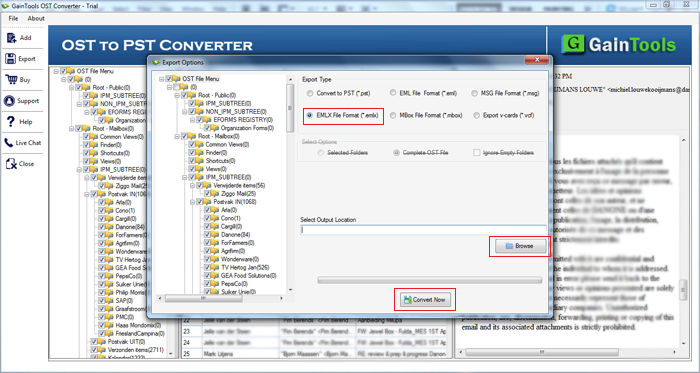
- Output location of user choice to save EMLX files
- Free OST to EMLX Exporter to analyze the tool
- 100% safe conversion of OST database to EMLX
Items to be exported using OST to EMLX Exporter
The complete emails of Offline Storage Table to EMLX format gets completed in a few clicks by the software. Without considering the size of OST file, the tool easily export unlimited email messages to EMLX format.
All the email attributes like to, cc, bcc, from, sent, date, etc. are safely exported with OST emails.
With email messages, all the attached files like images, documents, audio, video, etc. is also exported from OST file to EMLX file format. The tool will not lose any attachment..
Folders from OST file are selectively exported by the application. You can choose Inbox, Outbox, Sent Items, Drafts, or any selected folder of your choice and export it into EMLX file format.
Support all the MS Outlook Versions
 Outlook 2019
 Outlook 2016
 Outlook 2013
 Outlook 2010
 Outlook 2007
 Outlook 2003
 Outlook 1997
 Outlook 2000
Detailed features of the tool to export OST emails to EMLX
Export OST to EMLX
The software supports instant conversion of OST emails to EMLX with attachments. With this software, one can easily export complete items of OST file to EMLX format. By this, OST file can be easily readable on Apple Mail client.
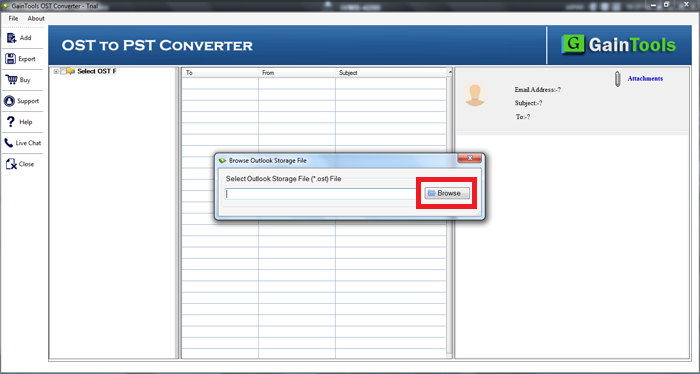
If you go through the manual methods, it will take a lot of time plus there is no surety of data safety. Therefore, we have come up with this advanced solution which has only 4 simple steps to perform the conversion.
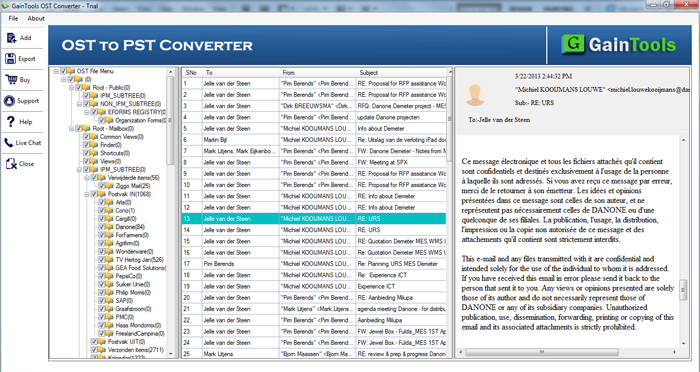
Provides quick preview
Once OST file is added on the software panel, a complete preview of OST database is provided by which users can check the files and their accuracy. By this, you can also get an idea of how these files will appear in Apple Mail client..
The inbuilt-preview feature makes the application unique from others and you can easily check all the items before finalizing the conversion and performs better conversion.
Export any large OST file
All size OST files are most welcomed by the application. Whether you have a small OST file or large OST, the application easily exports the items without manipulating the original database.
Regardless of mailbox size, the conversion of OST emails to EMLX gets easily completed without any errors. One by one, unlimited OST files are exported to EMLX file format.
No additional application required
In order to export OST database to EMLX file format, there is no need to install any additional program like MS Outlook. Without installation of Microsoft Outlook, the conversion of OST file to EMLX gets finished.
Moreover, connectivity to Exchange Server is not at all required to perform the migration. Users just need OST file and the software to execute the conversion task.
Scan and selected items migration
OST file is completely scanned by the software once uploaded to the software panel. Every item of OST can be quickly scanned by the tool and after that you can check the complete database.
After that, choose desired folders or item from OST and migrate them to EMLX file format. You can mark desired items and leave extra items behind before exporting OST database to EMLX file format.
Compatible to Outlook & Windows OS
OST 2 EMLX Exporter is compatible with major versions of Microsoft Outlook and Microsoft Windows. No issues are found in on any Outlook & Windows editions.
MS Outlook - The software supports MS Outlook 2019, 2016, 2013, 2010, 2007, and below versions.
Windows - Easy to download on all editions of Windows such as Windows 10, 8, 7, XP, Vista, and others.
Export OST to EMLX Freeware
Free OST to Apple Mail EMLX Exporter is available so that users can check the utility and its complete features before buying it. This will help you in deciding whether to invest in this application or not.
With freeware edition, you can export only 10 items from each folder of OST. Additionally, to settle down all your queries, you can contact our support team which is available 24*7.
Sustain original files
All the items of OST are safely exported to EMLX format using this smart application. The tool preserves all the email attributes like to, sent, from, cc, bcc, date, time, etc. With this, hyperlinks, inline images, attachments, font styles, etc. are retained throughout the conversion.
The hierarchy of OST folders is completely retained by the application even after the conversion task is completed.
CLIENT REVIEWS
"I checked multiple solutions to convert OST database to Apple Mail but not find a perfect solution. After that, I got Export OST to EMLX Tool and it has effortlessly exported OST data to EMLX without using MS Outlook."
- Martin Bell"Thank you so much for developing this brilliant solution. The tool supports all Windows OS and provide precise conversion results without showing any errors."
- James GowdieFrequently Asked Questions
SOFTWARE SCREENSHOTS