OST TO VCF CONVERTER
Total Ratings: 105 - Average Rating: 4.7 out of 5A proficient solution to export contacts from OST file to VCF file format. OST to VCF Exporter easily converts large OST contacts files to vCard format so that OST contacts can be accessed to multiple platforms and devices.
- Export OST contacts to VCF file format
- Export Outlook OST file of large size
- Easy and quick installation
- Export complete contact details
- Export selected items from OST file
- Access OST contacts to various devices - Android, Blackberry, etc.
- Save extracted contacts to any location
- Free trial availability for all users
- Supportive to all versions of Exchange & MS Outlook
- No requirement to install additional application
- Windows 10, 8, 7, & others are well supported
- No modification to actual OST files
- 100% error-free conversion without any damages
ITEMS TO BE EXPORTED USING OST TO VCARD EXPORTER
All the contact details of OST file are exported including name, spouse name, birth date, nick name, etc. to VCF format. With this OST 2 VCF Converter, one can easily convert any large OST file without any confusion. Any number of contacts are easily exported by the application.
The software is designed in a manner that it allows conversion of contact items like business, home, and primary number. Without manipulating the original items, one can export complete contact information from OST to VCF format.
The entire address mentioned in contact details such as business, home, or other address is completely exported from OST file to VCF file format.
Support all the MS Outlook Versions
 Outlook 2019
 Outlook 2016
 Outlook 2013
 Outlook 2010
 Outlook 2007
 Outlook 2003
 Outlook 1997
 Outlook 2000
Remarkable features of OST to VCF Exporter
Export contacts with full details
The software exports OST complete details like name, address, mobile number, email address, logos, images, attachments, etc. without misplacing a single element.
Without limiting the size of OST file, one can export OST contacts to VCF format so that Outlook OST contacts can be easily accessed to multiple devices and platforms like android, blackberry, and multiple email clients.
Standalone application
Export OST to VCF Tool does not demand installation of MS Outlook to perform the conversion. Without installing Outlook and without connectivity to Exchange Server, the conversion can be easily finished in a few clicks.
Additionally, OST contacts extracted from all editions of Outlook are supported by the application including Outlook 2019, 2016, 2013, 2010, 2007, etc.
Migration with 100% accuracy
To migrate OST contacts to vCard format, the tool takes care of user database. No file is misplaced and corrupted throughout the conversion. 100% precise and safe conversion results are offered by the tool.
All the data is kept safely and neither the information is modified nor changed while performing the migration. No extra efforts are require to put to achieve the conversion.
Export OST of any large size
OST file of every size is supported by the software. Whether you have a large file or small file, you can easily export contacts of OST into VCF format. The size of file does not slow down the performance of the software.
Having a friendly interface, users don’t face any kind of difficulty in operating the tool. You are required to follow only 4 simple steps to complete the conversion.
Totally Windows supportive
The application supports all versions of Windows without any issues. You can easily download OST 2 VCF Exporter on various editions of Windows - Windows 10, 8.1, 8, 7, XP, Vista, and others.
The application easily export orphaned and inaccessible OST files easily on all Windows without troubling the already running tasks of the system.
Freeware OST 2 VCF Exporter
A demo version of OST to vCard Converter is available so that users can check the features of this application before applying for the license edition. The demo version works like the licensed edition.
It is helpful for users to check the suitability of the program. By trial edition, one can export 10 items from OST folder to VCF format. For exporting complete contact details, one need to apply for the licensed version.
Detailed preview before conversion
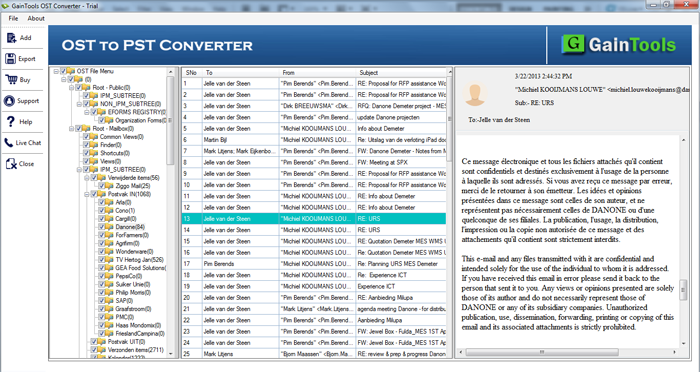
Before finalizing the conversion, OST file is scanned by the software. After that, a complete preview of OST database is provided before the conversion. One can check the complete database with preview feature and then move the files for migration.
Moreover, users can select desired items from OST and move them to vCard file format. This help users to reduce the load of unnecessary items.
Hold originality & file quality
Throughout the conversion, the quality of OST contact files is not all hampered. It remains the same as it was before the migration. The complete formatting and folder hierarchy of OST folders keeps intact by the tool after the migration.
The application export OST contacts to VCF with full accuracy. There is not a single chance of data loss and file misplacement.
CLIENT REVIEWS
"I was trying to extract contacts from OST file to access these contacts to my mobile phone. I read out various solutions on the internet but found them really confusing. Finally, I found Betavare Export OST to VCF Tool and after complete satisfaction using demo version, I applied for the tool and I am happy with the working and my decision to invest in this software."
- Nicole Elia"The application has exported 12000+ contacts from OST file to VCF file format in a couple of clicks. I got entire contact details of OST exported into VCF file format without modifying the original files."
- Markus GerigFREQUENTLY ASKED QUESTIONS
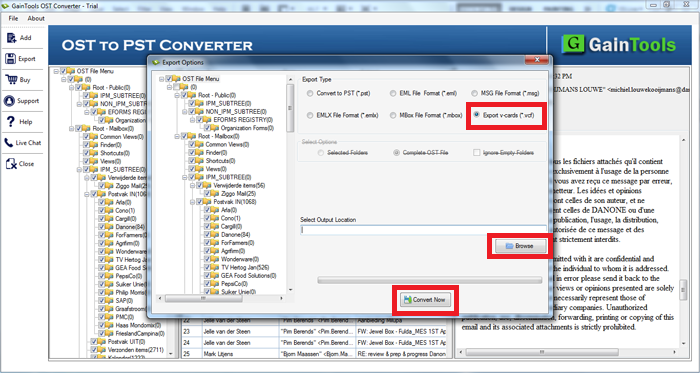
To export OST contacts to vCard, follow the below-mentioned steps -
- Download and Install OST to VCF Exporter.
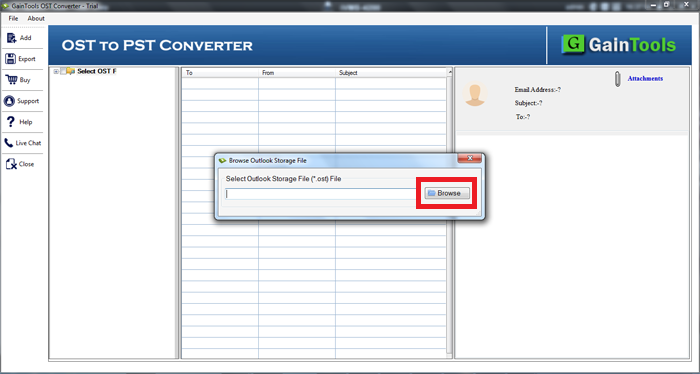
- Select OST file using the Browse button.
- Get preview and select items to export.
- Select Export to vCard format.
- Mention an output destination to save resultant file.
- Click on the Convert Now button to start the conversion process.
SOFTWARE SCREENSHOTS