
BETAVARE PDF PRO
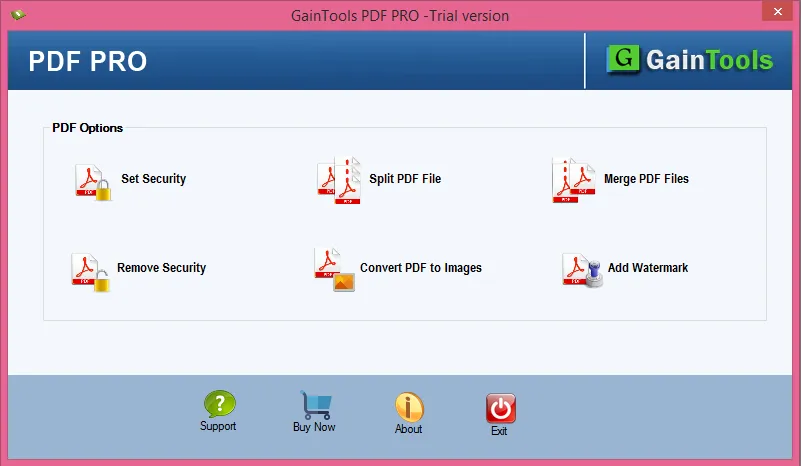
Total Ratings: 127 - Average Rating: 4.6 out of 5Merge, Split, Convert, Protect, and Insert Watermarks to your PDF Files using this professional PDF Pro Software in One-Click!
- A simple yet reliable solution to manage PDF files while maintaining data integrity.
- Encrypt your PDF from unauthorized printing, copying, and editing access.
- Split the heavy PDF file into smaller sections.
- Remove password protection of the PDF for better access and sharing.
- Add a watermark in text or image formats to PDF documents.
- Merge multiple light PDF files into one for enhanced workflow.
- Move PDF documents to various image formats such as JPG, BMP, and PNG.
- Compatible with every version of Adobe Acrobat.
- Runs seamlessly on Windows, all editions.
- Displays a preview of the uploaded PDF file before finishing the process.
- No need to install extra software, as it's an independent utility.
- Self-explanatory application, no technical skill required.
- Features a demo version for analysis without any charges.
- Comes with a simple and intuitive user interface.
ITEMS HANDLED BY BETAVARE PDF PRO UTILITY
This PDF Pro manages all aspects of your PDF files, be it text, images, attachments, and embedded objects. It retains everything, in the same way, without losing or changing anything while merging, converting, splitting, or unlocking. You don't have to worry about any alteration in the formatting, structure, and content; it handles them all.
You can secure PDFs by assigning passwords and restricting edits, prints, or copies. The tool can also unravel passwords and restrictions, allowing you to access locked PDFs without any worries.
The tool processes all attachments contained within your PDF files, from other documents to photographs or any other file types. It retains the attachments untouched, safely transferring them to the output file without modification or corruption.
If you want to work with a specific PDF file, this PDF Pro allows you only to select the pages, images, or particular file or folder to convert, merge, or extract without any extra or complex steps.
This PDF Pro uses folders just like email folders or folders on the computer to organize your PDF files. It keeps everything intact, bookmarks, links, and page order, when merging or splitting large PDF files.
Merge multiple PDF files into one or split a larger PDF into smaller segments. The tool keeps the order and placement very proper to keep you organized and neat without undue alterations.
Support All Adobe Acrobat PDF Versions
SIGNIFICANT FEATURES OF PDF PRO UTILITY
Gives Instant and Accurate Output
Be it merging, splitting, adding or removing password protection, converting to image formats, or inserting watermarks, all tasks are smartly and quickly performed by this tool without altering the original data of the PDF file.
You don't have to worry about layout, formatting, and data corruption throughout the process; it will ensure the safety of the file and provide precise results efficiently.
Windows and Acrobat Compatibility
This PDF Pro utility offers wide compatibility with Windows, such as Windows 11, Windows 10, Windows 8, Windows 8.1, Windows 7, and below, without any trouble.
It can work efficiently with all versions of Adobe Acrobat PDF files, whether older or the latest versions. It doesn't matter; it accepts PDF files from all versions.
Unlimited Upload Capacity
If you have a batch of large PDF files on your system that you want to convert to images, or maybe protect them from unknown access, you can upload all of them to this tool for the task, as there is no file size restriction.
It can process all your heavy and bulky PDF files all in one go without any lag or system blackouts within a few minutes, and delivers accurate results while preserving data corruption.
Secure PDF Files with Password Protection
With the help of this smart tool, you can add password protection to your important PDF files, which will restrict unknown access to PDF files without the owner's permission.
To protect your file, you can also restrict actions like copying, editing, and printing of your PDF file if the data is crucial and something that shouldn't be shared without your permission.
Split Heavy PDF Documents
If you want easy access and sharing of PDF documents, through this feature, you can divide your one heavy PDF file into numerous smaller sections, which will be easy to load, share, or archive.
You can divide the file by adding page numbers, which will give you more precise results for your files. No matter how heavy your PDF file is, it will handle and split it seamlessly with just one click without losing any data, formats, or layout of the original file.
Remove PDF Restrictions
In the situation where you might receive an encrypted PDF file and want to eliminate the restriction or password, for better access and workflow, this tool smartly removes all types of restriction and password protection from the chosen PDF file.
You need to enter the correct password of the PDF file, and this tool removes all the restrictions from the file, be it copying, editing, printing, or anything.
Consolidate multiple PDF Files
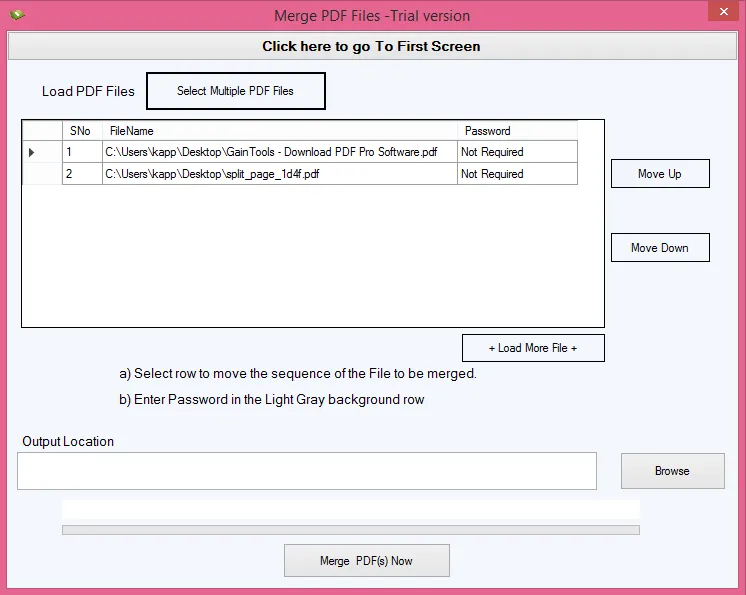
For simplified sharing, storage, cohesive documents, and professional presentation, you can merge your numerous PDF files into a single strong PDF file with the merging feature of this, within a few clicks, as managing several PDF files can be time-consuming.
Use the up and down keys to arrange each file in an organized and systematic layout for a clean look.
Insert Text or Image Watermarks
If you want to do styling for a brand, secure, or add notes to PDF documents, this features allow you to freely customize and add a Watermark to a PDF file in both text and image formats.
You can customize the watermark's font, size, color, and position for text format and can insert, position, and rotate the images according to your task requirements efficiently without any problems.
Converts PDF to Image Formats
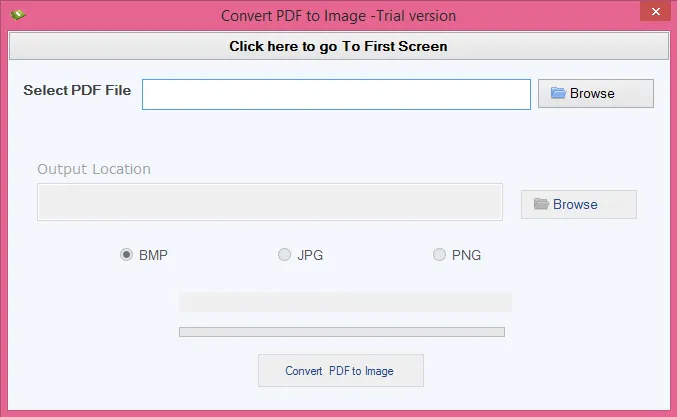
You can convert your PDF file into images with the help of this PDF to Image Conversion feature of this advanced tool. It offers multiple formats like PNG, BMP, and JPG image formats that you can convert your PDF into without harming your original file data.
Converting PDF files into different image formats offers wide platform compatibility, enhances sharing, is useful in embedding presentations, and preserves the visual layout exactly as they were in the original PDF file.
Fully Standalone Utility
You don't need to install any additional software to run the process, as this utility is completely independent and can operate well without any extra help. Just download this utility on your system and launch it; it will run directly and perform all its advanced functions.
It's easy to use, delivers speedy results, enhances security, and the best thing is that it can run without any internet connectivity, which makes it perfect for every task.
Get a Preview of the PDF
To know exactly what you will be getting as output, this tool offers a preview feature, in which it displays a preview of the uploaded PDF file in the preview pane. You can casually examine each item listed in the uploaded document and avoid unnecessary file processing.
With this feature, you can ensure precise results, verify your file before finishing the process, save your precious time, and prevent mistakes by reviewing the document's layout, selected pages, and content before processing the file.
User-friendly and Modern GUI
It comes with an easy-to-navigate and self-explanatory interface that can be processed by any user; you don't need any technical knowledge or expertise to work with it.
Its intuitive and simple UI helps in efficient workflow and removes all stress regarding the program setup and data loss. You can also try the demo version of this utility without any charges.
CLIENT REVIEWS
"I had multiple small PDF files on my system which I needed to review for my work, but opening each file individually is very time-consuming and frustrating, so I tried this BetaVare PDF Pro Utility to merge those files into one, and this professional tool did it so well without any issue. I totally recommend this tool as I had a great experience with it."
- Eric L. Miller"I really liked working with this tool. If you want to merge, split, add a watermark, remove, or add password protection on your PDF document, you can do it all with this one utility easily. The best part is that you don’t need any technical skills to use this tool. It’s a totally beginner-friendly tool."
- Cinthia C. JaroszFrequently Asked Questions
For the process, follow these simple steps listed below:
- Download and open the utility on your computer.
- Choose the Desired Option, such as Set Security, Split PDF File, Merge PDF File, Remove Security, Convert PDF To Images, or Add Watermark.
- Browse and Select the PDF File that you want to perform the task with.
- Perform Desired Task, depending on the selected option in step 2.
- Browse and add the Output Location, where you want to store your file, and hit the Process button.
Yes, it can easily remove protection from any encrypted PDF file. You just need to add the current password, and it will handle the file.
Yes, select all the files and use the merge PDF file option to combine them single PDF file.
Yes, this utility can convert PDF documents into different image formats like BMP, JPG, and PNG.
Yes, this tool is fully secure and reliable to use, as it guarantees complete data integrity and privacy. You can trust this tool with your valuable data.
SOFTWARE SCREENSHOTS