
BETAVARE PST DUPLICATE REMOVER
Total Ratings: 177 - Average Rating: 4.5 out of 5Tired of seeing similar emails again and again? Get rid of them with BetaVare PST Duplicate Remover in Outlook with just a few clicks, quickly, securely, and without any trouble.
- Detect and delete mirrored PST files containing emails, calendar, contacts, notes, and more easily
- Works without the installation of Outlook, and can remove duplicates from PST independently
- Offers selective or batch removal of duplicate PST and OST files
- Dual scanning option, choose between all folders together or within a specific folder
- Eliminate similar PST files seamlessly and securely with this advanced tool without data corruption
- Both ANSI and UNICODE versions of MS Outlook are supported by this tool
- Can work with heavy PST files, as there are no constraints on the size of files
- Runs well on Windows, both older and latest versions, without any issues
- Makes sure that all items like emails, metadata, structure, layout, and attachments are intact just like the original files
- For accuracy, it offers a smart scan and preview of the uploaded PST/OST file before eliminating the files
- Comes with a clean and modern GUI that even a beginner can understand
- Can store the resultant file in your desired path
- It can efficiently find and remove encrypted and archived PST files
- A no-cost trial edition is available for the analysis of the app before investing in the full one
Data Items To be Removed by Using PST Duplicate Remover
To maintain full integrity and layout of the original file during and after the removal, this tool deeply scans your mailbox folder and detects the duplicates according to the criteria like sender, recipient, attachments, date, and subject, and then deletes them. It smartly delivers the desired result without losing any file.
for optimized PST storage and enhanced Outlook performance, this software goes through each duplicate attachment of PST files and identifies duplicates on the basis of name, size, and content of the attachments.
It also offers an option to remove or retain the attachments you choose what you want.
This PST duplicate remover tool identifies and processes all the folders in Outlook, including the inbox, drafts, deleted items, junk mail, custom folders, and sent items. It also offers the flexibility to select a specific folder and give authority over the process.
To help in accurate removal, you can add filters like subject, date, and sender to eliminate duplicate PST files based on them.
It removes duplicates by scanning all the calendar elements like location, start time, end time, and subject without making any change to them, and delivers the unique PST file.
All attachments in the calendar are also sorted based on business card, files, and signature, and the original is exported only.
List of the various calendar types that are supported by this tool.
- Tasks
- Events
- Meetings
- Appointments
Appointment reminders are easily converted by the software in a trouble-free manner.
This tool smartly scans contacts in your PST file and compares them to find any similarities, so it can sort them out and later delete the unwanted files from that folder. It checks the contact on the criteria like last name, first name, nickname, birth date, etc., and completes the process successfully.
PST duplicate remover lets you delete the address items as well, like business, home, and other addresses.
Without compromising the data security and privacy of the users, this application filters the whole tasks, including start date, due date, reminder, owner information, subject, etc., and removes them from the folder.
- Due Date
- Subject
- Start Date
- Status
- Reminder
It's examine the attachment in the task file and then remove the unnecessary attachments.
You even scan through the remainders set in the tasks folder and safely select the important ones.
This software lets you examine the notes in the PST files without affecting the original ones, and after detecting the duplicates, it will complete the process without harming the files.
You can choose to go through all the folders or a specific one according to your job requirements. It’ll sort them based on the setting and remove the unwanted files from all those folders. You can rest assured that your files won’t be corrupted or lost during the process.
Support all the MS Outlook Versions
 Outlook 2019
 Outlook 2016
 Outlook 2013
 Outlook 2010
 Outlook 2007
 Outlook 2003
 Outlook 1997
 Outlook 2000
Notable Features of the PST Duplicate Remover Tool
Clean up the Duplicate PST file Effortlessly
It's a high-tech app that intelligently detects duplicate emails, attachments, calendar, notes, and contacts from PST files without making any changes in the content of the original file, and offers a unique PST file.With the help of this feature, it delivers accurate results, makes the process time-efficient without any complex guidelines for you.
Processes heavy PST and OST files
If you have a huge Outlook data file with hundreds or thousands of copied items in it, you don’t have to worry about it. This tool will handle them smartly with all its advanced filters, without harming the original file data, in a few minutes.It's a virus-free tool, so you don’t have to worry about data corruption or system crashes.
Handles a Batch of PST files in one go
This tool can easily manage multiple PST and OST files all at once in a fraction of minutes, smartly. You don’t have to work with each file one by one, just upload all your files and this tool will find and delete all the duplicates like contacts, emails, attachments, notes, and calendar.
It's an ideal tool for fast and effortless task completion without any tricky steps or rules to run the process.
Fully Standalone Tool
If you have PST files like ANSI, UNICODE, archive, and active, any type, this tool accepts them and removes the duplicates without the installation of Outlook on your system.
If you don’t have Outlook on your system no worries it's an independent tool that works locally. You just need to download it, and it will handle the PST files on its own.
Smart Scanning and Preview Option
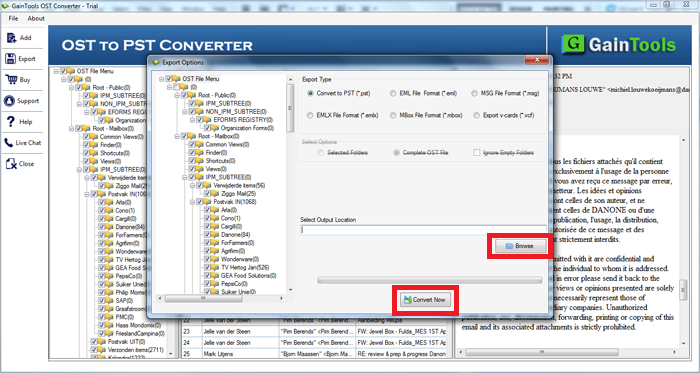
To make sure that a precise result is being passed it automatically scans the uploaded PST file or folder and generates a preview of the files in the preview pane.
This option helps you to know exactly what you are exporting and how the resultant file will look. So that you can examine the file visually before continuing the process.
Sort Duplicates by Two Modes
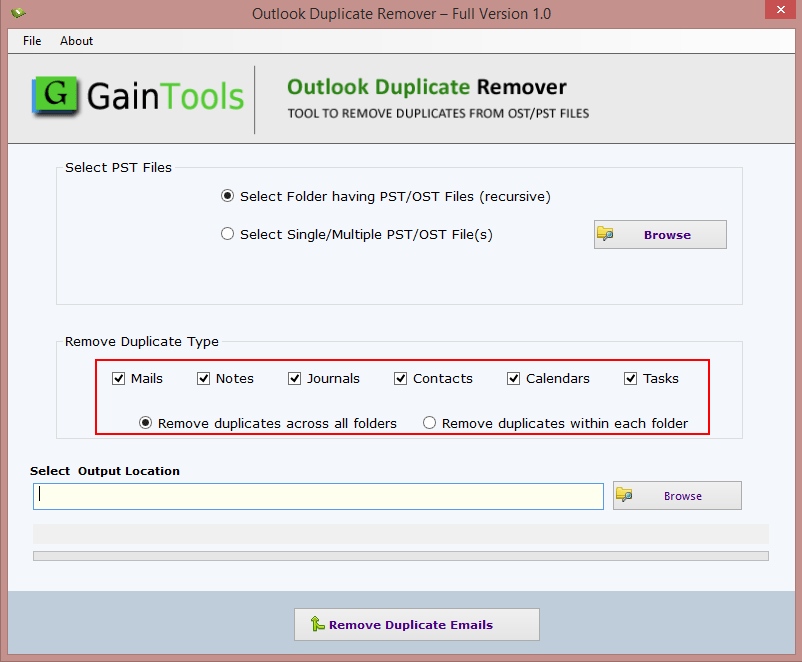
For intelligent sorting of mirrored content, this tool offers detection of copied items in all folders and each single folder.
If you select all folders, it will scan and find similarities through all the folders. If you select each single folder, it will only go through that specific folder, give you the duplicated files, and you can remove them.
Freedom to Save Output filesn
For better access and experience, you can store the output wherever you want, as it lets you select the preferred location to save the unique PST file.
Before clicking the Remove Now button, it will ask you to enter the location you want to save your PST file to. You can create a fresh folder or save it in an existing one; do what aligns with your task more.
Maintains Data Integrity
Throughout the process, this tool only removes the similarities and doesn't make any changes in the format, attachments, and structure of the original file's content.
None of your PST or OST file data will be corrupted or lost, as we ensure to back them up for safety and security purposes.
Windows Compatibility
This is a widely compatible tool and offers cross-platform interoperability without any problem, be it old or latest editions of Windows you don’t need to worry about it.
You can simply download it on all versions of Windows effortlessly with just internet availability.
Supports MS Outlook
Version 2019, 2016, 2013, 2010, and others of MS Outlook are supported by this tool, no matter which version you’re PST and OST files are from, it won’t hinder the process of removal of this tool. It will accept any MS Outlook version PST file and deliver the desired results.
Beginner-Friendly UI
It doesn't matter if you are a novice or expert in tech line, you can easily use this software without any technical skill or consulting.As, this tool has a modern, intuitive, and self-explanatory GUI that is suitable for all users and very easy to work with.
Comes with two versions : Demo and Full
For a better user experience, we offer a free of cost demo version, which you can try and test all the features of this tool before investing in the license version.
In the demo version, you can remove up to 10 PST files and enjoy all the exclusive features of this tool without any charges.
CLIENT REVIEWS
"Working with this tool made my task much easier and faster, as I had a huge PST folder with lots of duplicates in it, which happens because of archiving and accidental sharing. And removing them manually was so time-consuming so I tried this tool, and to my surprise in a few minutes, it did all the scanning and removal of unnecessary data without harming any of my actual file content. Loved working with this tool and will definitely use it in the future as well!"
- Renee C. Lamm"Personally I will recommend this tool to every newbie as this tool user interface is so simple and easy to understand. I was so skeptical when one of my colleagues told me to use this tool because I don’t have any technical knowledge about how to sort and remove duplicate items from PST files but I just uploaded my PST file, and it did all my work. Thank you, BetaVare, for developing this tool for beginners."
- Cindy T. PhelpsFrequently Asked Questions
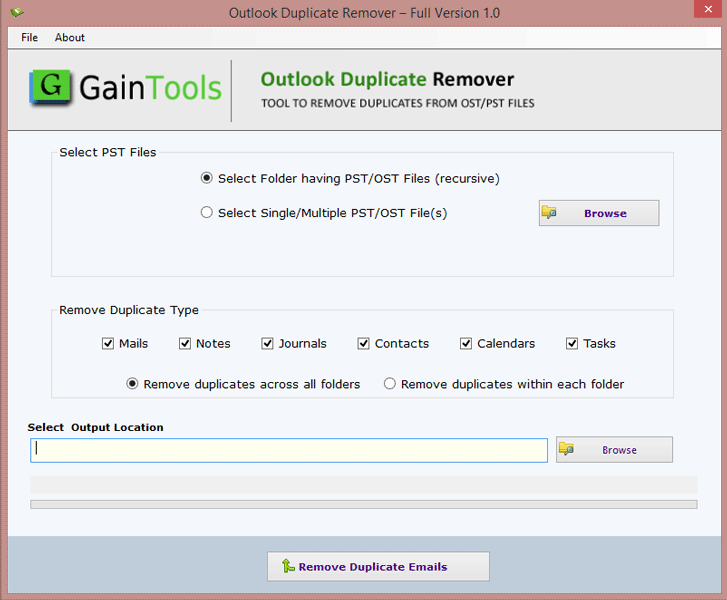
No worries, just follow these easy and simple steps to run this tool:
- Download and install the software on your system and run it.
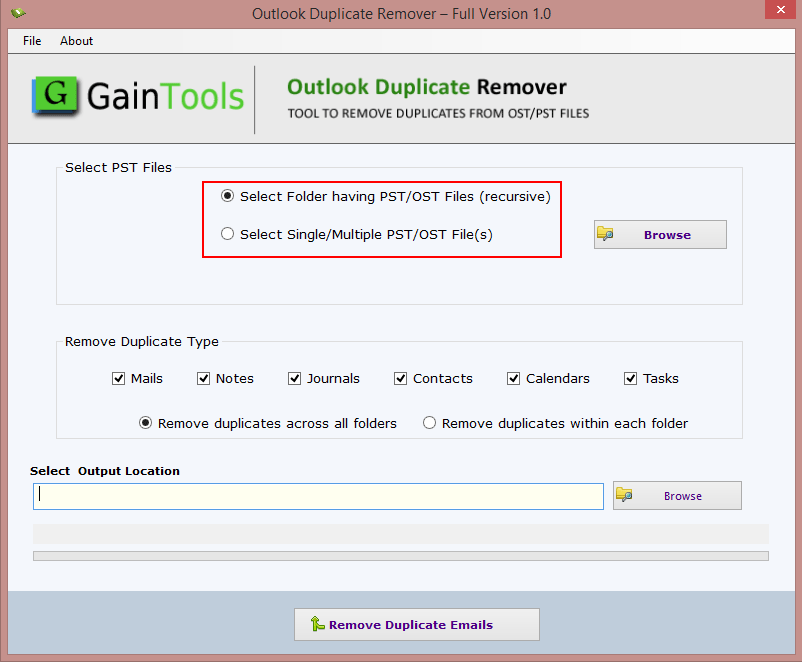
- Select PST files by adding the filter listed below and click Browse.
- Select Folders having PST/OST files
- Select Single/Multiple PST/OST files
- To Remove Duplicate Types, you can add filters by Mails, Notes, Journals, Contacts, Calendars, and Tasks. -You can also add Remove Duplicates across all folders or Remove duplicates within each folder.
- Click Browse and select the Output Location for your output file that you want to store in.
- At last, click the Remove Duplicate Emails to complete the process.
 >
>
SOFTWARE SCREENSHOTS