EXPORT PST TO VCF
Total Ratings: 130 - Average Rating: 4.9 out of 5Get an easily solution Export PST to VCF Tool to export PST contacts to vCard/VCF file format. Unlimited Outlook contacts can be exported to VCF easily with full accuracy. 100% safe extraction of Outlook contacts to vCard is performed.
- Extract unlimited Outlook contacts to VCF format
- Easy conversion of PST contacts to vCard
- Preserve entire contact details in exact form
- PST to VCF Converter Freeware to import 10 contacts per PST folder
- No restriction for PST file size
- Independently convert .pst to .vcf file format
- Supportable for all MS Outlook editions
- Avail graphical user interface
- Support Windows 64bit and 32bit editions
- Offer 100% successful conversion without any modifications
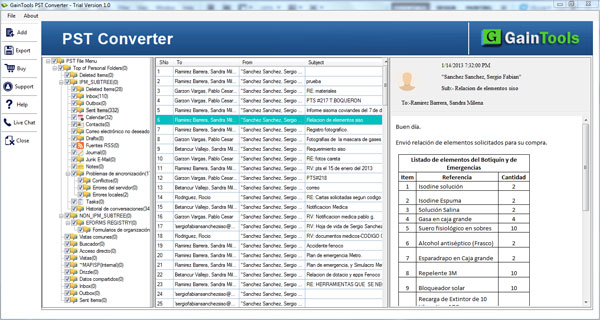
- Preview options available before migration
- Maintain hierarchy of folders completely
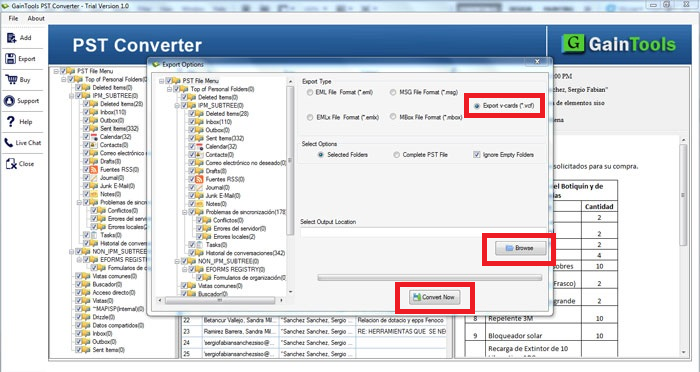
- Desired location for saving VCF files
Items to be exported using PST to vCard Export Tool
Outlook contacts are easily exported to VCF file format using Export PST to VCF Tool. The complete contact details such as birth date, nickname, spouse name, etc. are completely exported from Outlook & save into VCF file format. Bulk extraction of Outlook contact items is there with this software without altering the original files.
The application export the contact details such as primary, home, and business number. By utilizing this application, one can export phone numbers from Outlook to vCard format.
- Primary number
- Business Number
- Home Number
Outlook to vCard Exporter export contact details such as home, business, and other addresses without any damage to single element. By utilizing the software, one can easily export all addresses.
- Other Address
- Business Address
- Home Address
Support all the MS Outlook Versions
 Outlook 2019
 Outlook 2016
 Outlook 2013
 Outlook 2010
 Outlook 2007
 Outlook 2003
 Outlook 1997
 Outlook 2000
Software features in details
Export PST to vCard independently
Independent of MS Outlook or any additional program, one can easily export Outlook contacts to vCard format. The complete contact details are exported with this application without facing any kind of trouble.
Manually, several solutions are available online but they can’t export Outlook contacts to VCF file format without using Microsoft Outlook. With PST to VCF Converter, one can easily perform the conversion without any losses.
Bulk extraction of contacts
With this amazing application, one can easily extract unlimited contacts from Outlook to VCF file format. There is no such limit specified by the application on the number of items. In a single attempt, unlimited contact files are easily exported from Outlook to vCard format. Keeping every contact detail intact, the conversion of contacts is performed without getting any errors.
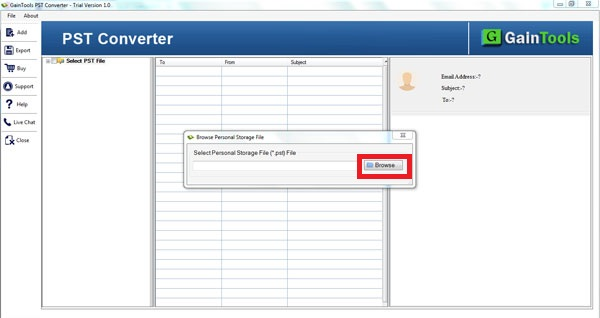
With just 3 simple steps, one can easily transfer Outlook contacts into VCF file format. These steps are adding PST file, preview, mention an output destination, and finalize the conversion.
Offer PST to VCF Freeware
Free PST to vCard Converter is available by which users can check the working performance of the application before buying it. Free version works same as the license edition. By this, one can extract 10 items per folder of PST into VCF format.
Then, users can apply for the license edition as per their requirements - personal, business, or enterprise edition.
Comes with simplified interface
Export PST to VCF Tool comes with a simplified interface by which anyone can easily understand the working procedure of this application. No prior technical expertise is needed to operate the application.
With the guiding interface, it is too simple to understand the process of conversion without facing any difficulty. Moreover, users can take help of images and manual guide provided on the official page.
No file size restrictions
Any big size PST file can be easily converted to VCF format with this application. Due to the size of PST file, the application working does not slow down. You can effortlessly export any over-sized PST file to VCF format with this amazing third-party tool.
Moreover, users can easily export PST file of all Outlook editions like Outlook 2019, 2016, 2013, 2010, 2007, 2003, and others without any issues and by exporting PST contacts to VCF format, one can access Outlook contacts on android devices, blackberry, iCloud and others.
Protect original contact files
The original contact details is completely preserved throughout the conversion. With PST to vCard Exporter, you are capable to export Outlook contacts as it is into VCF file format without manipulating them.
All the images, attachments, and other attached files are safely exported from Outlook to VCF file format. Without facing any kind of data loss, the conversion can be easily accomplished.
Easy running on all Windows
With the third-party application, one can select output location of their choice and save VCF file accordingly. This will help users in easy management of the files.
Outlook to vCard Converter shows no compatibility issues with any Windows platforms. You can easily download and install the application on latest as well as older versions of Windows including Windows XP, Vista, 7, 8, 8.1, 10, and others.
Fast and smooth conversion
Now convert .pst to .vcf file format in a fast speed without any trouble. Several solutions are available but here we have come up with one of the best solutions that perform the conversion without any delays.
One can smoothly export Outlook contacts to VCF with PST to VCF Exporter in 3 simple steps which is not at all possible using manual solutions. The software offers smart and error-free conversion without any confusion.
CLIENT REVIEWS
"A week ago, I bought an android mobile phone. I want to import Outlook contacts to my mobile phone. I was finding a solution that will do the needful for me. I acquired PST to vCard Converter and it helped me in moving Outlook contacts to my android device."
- Faith Cyr"Excellent utility. It has moved my Outlook contacts to vCard file format in 3 easy steps and I haven’t faced any kind of issues in handling this application. Thank you Betavare for this amazing creation."
- Dennis StevensFrequently Asked Questions
SOFTWARE SCREENSHOTS