
EXPORT TGZ TO MBOX
Total Ratings: 157 - Average Rating: 4.9 out of 5Export TGZ to MBOX Tool easily transfers Zimbra emails to MBOX file format to access on Thunderbird, Spicebird, Entourage, Eudora, Netscape, KMail, Postbox, SeaMonkey, etc.
- Export Zimbra emails to MBOX with associated attachments
- Instantly export emails from Zimbra to Thunderbird MBOX
- Capable to export unlimited Zimbra desktop to MBOX
- No need to install Zimbra or Thunderbird email client
- Preserve email properties and email formatting
- Save resultant MBOX at desired location
- Inbuilt preview functionality
- Compatible with all versions of Zimbra desktop
- Support multiple MBOX supported email clients
- Convert TGZ to MBOX Free Demo for all
- Export desired Zimbra items
- Well suited to all Windows OS
- Easiest working GUI for hassle-free conversion
Items to be exported using TGZ to MBOX Exporter
Zimbra email messages are safely exported to MBOX file format with this application. Without any limitations, the conversion of Zimbra emails to MBOX file format is performed by the tool.
Along with Zimbra emails, email components such as to, cc, bcc, subject, time, date, from, sent, hyperlinks, font, background, inline images, attachments, etc. are safely exported from Zimbra to MBOX file format.
Along with email messages, the attachments are exported from Zimbra to Thunderbird. The utility considers DOC, PPT, XLS, PDF, Video, Images, and others without hampering the quality of original files.
Support All Email Clients Platforms
 Windows Live
Mail
Windows Live
Mail The Bat!
 Outlook Express
 eMail Client
 Thunderbird
 Entourage
 Apple Mail
 IncrediMail
Detailed features of Export TGZ to MBOX Tool
Export Zimbra emails to MBOX
Export Zimbra to MBOX Tool supports instant conversion of TGZ files to MBOX file format. One can quickly export Zimbra emails to MBOX with attachments. Attached files of every type like DOC, PPT, PDF, RAR, XLS, XLS, etc. are safely exported without losing a single element.
All healthy TGZ files are exported with this application without hampering the quality of original files. Plus, no errors are shown by the tool.
Zimbra emails preview prior export
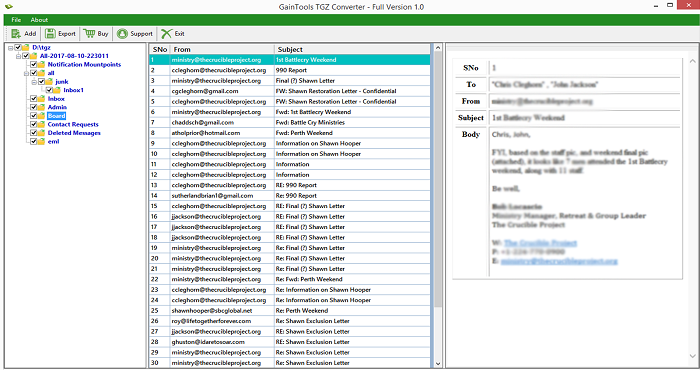
One can preview every message of Zimbra TGZ file before starting the conversion. This will help users to recheck every item before the conversion. All the folders of Zimbra are previewed on the left side of the software. Users can choose the folders and preview them.
Moreover, users here can mark the desired folders for conversion and leave others behind when performing the conversion.
Keeps data integrity
With this Export TGZ 2 MBOX Tool, one can easily export Zimbra emails to MBOX without fear of data loss. The complete email information such as email attributes and email formatting such as to, from, cc, bcc, subject, date, time, hyperlinks, remains the same throughout the conversion.
In addition to this, the hierarchy of Zimbra emails remains the same after the conversion. There is no loss & corruption to any file.
Save in single or multiple MBOX
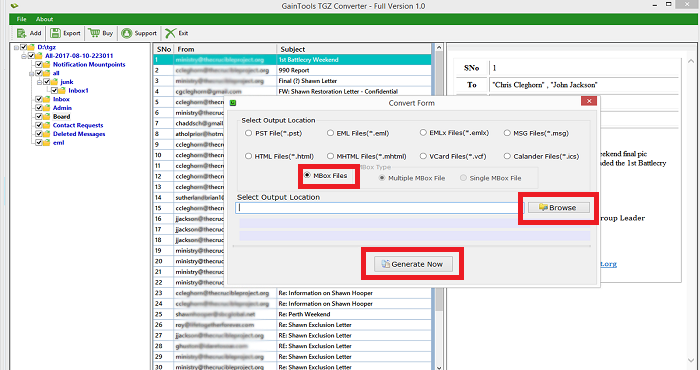
The application offers users to save the resultant MBOX file to any location of their choice. You can easily create a new folder and name it as per your desire. The application comes with two more options i.e. multiple MBOX files or single MBOX file option to save the resultant file. This will help users in easy management of the files.
No file size limit
Using TGZ 2 MBOX Exporter, every large size TGZ file can be effortlessly exported to MBOX file format. A huge size Zimbra TGZ file is also exported with ease having this application. Moreover, no chance of file corruption is there.
The size of file does not interrupt the conversion process. With a few simple steps, every huge TGZ file is seamlessly exported to MBOX file format.
Compatible with Windows & Zimbra
All editions of Zimbra are supported by the application including Zimbra 7.0, 2.0, 1.0, etc. Moreover, the software can be easily workable on all versions of Windows operating system such as Windows 10, 8.1, 8, 7, XP, Vista, and others.
Moreover, both 64bit and 32 bit versions of Windows are supported by the application without causing any trouble.
Access Zimbra file on multiple email clients
By exporting Zimbra files to MBOX file format, one can access Zimbra file to multiple MBOX supported email clients like Thunderbird, Mac Mail, Entourage, Eudora, SpiceBird, Postbox, KMail, SeaMonkey, OperaMail, Evolution and others.
Since MBOX file format is used by a wide range of email clients for data storage so you can easily import resultant MBOX to any of the MBOX supported email clients of Mac, Windows & Linux platforms.
Only 4 steps easy migration
Export TGZ to MBOX Tool offers only 4 simple steps and then you can access Zimbra files on Thunderbird, Mac Mail or any MBOX supported email clients.
- Install and Run the software
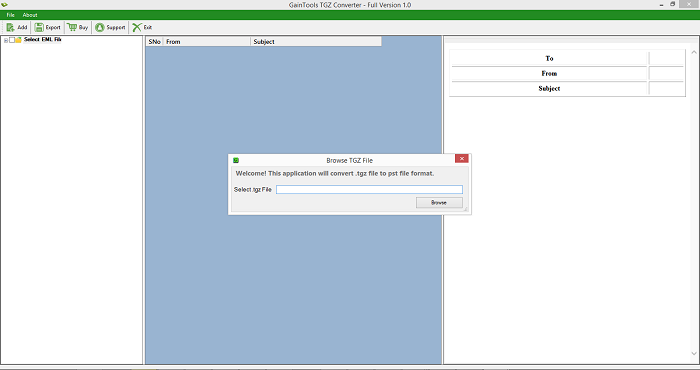
- Add TGZ file
- Preview the data and select items to export
- Provide output destination to save MBOX file
- Click Convert Now button
CLIENT REVIEWS
"I decided to export Zimbra files to Thunderbird as I was using both the email clients. For this, Betavare Export TGZ 2 MBOX Tool helped me in this migration. I am thankful to this team."
- Britney"I have successfully migrated TGZ files to MBOX with this amazing application. I have exported 10,000 TGZ files to Thunderbird MBOX without affecting the original files."
- ZackeryFrequently Asked Questions
Export Zimbra to MBOX Tool supports all editions of Zimbra including Zimbra 1.0, 2.0, 7.0, 7.1, 7.2, etc.
SOFTWARE SCREENSHOTS