
EXPORT TGZ TO MHTML
Total Ratings: 102 - Average Rating: 4.6 out of 5Download TGZ to MHTML Exporter and quickly export Zimbra file to MHTML with emails and attachments. The application offers 100% precise results by exporting TGZ file to MHTML in a few simple steps.
- Export Zimbra emails to MHTML with attachments
- 4 steps simple conversion to export Zimbra file to MHTML
- Save resultant MHTML file at desired output destination
- Support Zimbra desktop all versions(1.0.4, 2.0, 7.0, 7.2, etc.)
- Provides 100% safe migration
- Preview Zimbra emails prior starting the conversion
- Zimbra desktop not requiredto perform the migration
- Mark desired itemsfor conversion from Zimbra file
- Zimbra to MHTML Converter free downloadfacility for all
- Installed onvarious versions of Windows operating systems
- Retain hierarchy of folders and email meta information
- 100% accuracy in conversion
- Export every huge Zimbra TGZ fileeasily
Items to be exported using Export to MHTML Tool
One can easily export Zimbra email messages to MHTML format. The tool performs conversion of every large Zimbra file to MHTML file with email attributes and email formatting. The email attributes include -
- To
- Cc
- Bcc
- From
- Subject
- Email body
- Date
- Time
If the emails are associated with attachments, the application easily export them from Zimbra file to MHTML file format. Without misplacing a single attached file, the conversion can be easily completed. The attachments include -
- PPT
- DOC
- XLS\XLSX
- Video
- Image
Detailed features of Zimbra to MHTML Exporter
Export Zimbra mailbox to MHTML
One can effortlessly export Zimbra emails to MHTML file format with attachments. The software
provides the facility to open Zimbra TGZ files on Internet Explorer web browser when Zimbra
email client is not available with users.
One can comfortably carry out the migration
with Export TGZ to MHTML Tool by Betavare. Manually, it was not an easy and feasible
solution especially for non-tech background users.
Instant conversion without trouble
The program offers instant conversion of Zimbra emails to MHTML in just 4 simple steps.
Error-free conversion is performed by the tool without showing any errors.
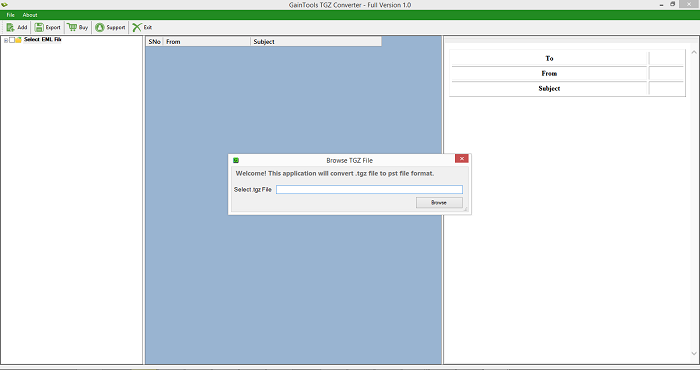
Simply add
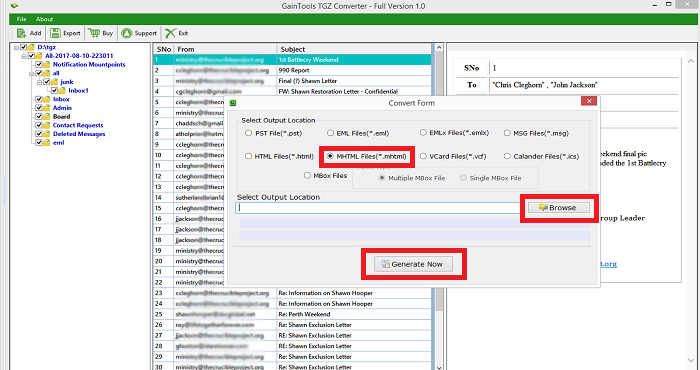
TGZ file, preview it, select items to export, choose MHTML file format for conversion and
provide a destination path to save MHTML files. Following these steps, you will get MHTML
file from TGZ file.
No Zimbra installation needed
It is not compulsory to install Zimbra desktop to export TGZ file to MHTML file. The tool
offers users the facility to complete the conversion without Zimbra.
However, TGZ
file extracted from all editions of Zimbra desktop are exported by the application. The tool
supports Zimbra desktop 1.0.4, 2.0.0, 7.0.1, 7.2.8, and others without any trouble.
100% secure results
The software has been well checked by experts. Several tests have been performed on this app
before introducing it among users. It is well tested on large size Zimbra files and accurate
results are offered by the tool without any errors.
The size of Zimbra file does not
reduce the speed of processing of the software. 100% successful and reliable conversion
without manipulating original files is offered by the tool.
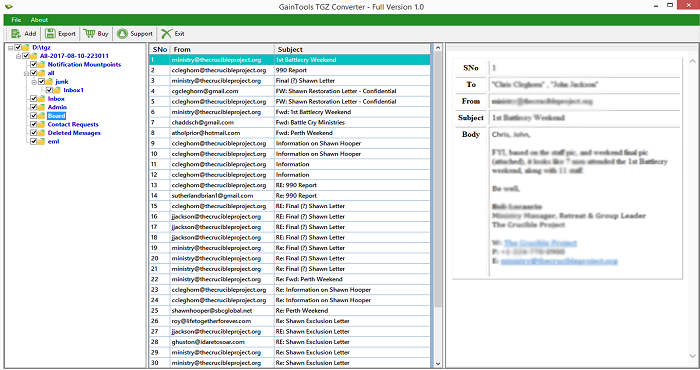
Generate preview of TGZ items
You can preview every item with email properties before moving them for conversion from
Zimbra to MHTML file format. By preview, one can check the database first and then move it
for conversion.
Earlier to preview, the added TGZ file is well scanned by the
software. Overall, the tool consists of all those features which are expected by users in
this app and this shows how the application is being designed as per user perspective.
Preserve subfolder structure
Export TGZ to MHTML Tool provides complete protection to email formatting, email properties
and folder hierarchy. The formatting and email components such as to, cc, from, email body,
subject, date, time, hyperlinks, font styles, etc. are well preserved while TGZ files are
migrating to MHTML.
Besides this, you will find the same folder structure in MHTML
files as before in TGZ file. The utility does not disturb the original folder series and the
quality of files.
Freeware TGZ to MHTML Tool
To check the software before investing money in it, you can simply download free edition of
the tool which has the same functions and processing speed like the licensed edition.
However, you are limited to perform the conversion to an extent.
Only 10 items
conversion from every TGZ folder is offered by demo version. To remove this limitation and
to export unlimited Zimbra files to MHTML file format, one needs to upgrade to the full
version.
Suitability with all Windows OS
No matter in which Windows OS you are working right now. You don't need to change or upgrade
your Windows OS to complete the migration. The tool easily suits all versions of Windows
operating system.
You can effectively export Zimbra file to MHTML on Windows 10,
Windows 8.1, Windows 8, Windows 7, XP, Vista, and others without facing any kind of issues.
CLIENT REVIEWS
"I was not using Zimbra email client but when I received a few files from my client in .tgz file format, I was unable to read the files without Zimbra desktop. I started searching for the solution and I strike with Betvare TGZ to MHTML Exporter. This made it possible for me to open these files by exporting them to MHTML file format without the involvement of Zimbra desktop."
- Brittany"I am amazed that the software easily exports large TGZ file to MHTML file format without any issues. I would refer this application to needful users."
- RodrigoFrequently Asked Questions
Yes, with Betavare Export TGZ to MHTML Tool, the conversion can be easily completed without installing Zimbra desktop.
SOFTWARE SCREENSHOTS