
EXPORT TGZ TO PST
Total Ratings: 178 - Average Rating: 4.7 out of 5Export Zimbra emails to Outlook with Betavare Export TGZ to PST Tool. The application easily exports TGZ files to PST without any data losses and access Zimbra files on Outlook 2019, 2016, 2013, 2010, 2007, & others.
- Export Zimbra emails to Outlook with attachments
- Export selected TGZ items into PST
- Preview of added Zimbra TGZ file
- Retains email data integrity
- Delivers easiest working GUI for hassle-free conversion
- No file size restrictions to export TGZ files into PST
- 100% assured conversion without any file damage
- Compatible with all versions of Zimbra and MS Outlook
- Installed easily on all Windows operating systems
- Preserve the real folder hierarchy
- Export TGZ 2 PST independent of any email client
- Set any output destination to save PST file
- TGZ to PST Converter Free Demo for all
Items to be exported using Zimbra Exporter
With Zimbra to PST Converter, one can export Zimbra emails to Outlook PST format. Without restricting the size of Zimbra mailbox, one can easily export TGZ email messages to PST format without manipulating the original element.
If you have attachments with email messages, don’t worry about it. The tool considers all attached files like documents, audios, videos, images, etc. with Zimbra emails and export it easily into Outlook email client.
Along with email messages, the conversion of Zimbra mail properties like to, cc, bcc, from, sent, date, time, subject, and others is performed by the tool. Not a single email element is damaged or left behind throughout the conversion.
The software can convert entire calendar elements such as location, subject, start time, etc. without modifying the details. By using this utility, one can convert appointments, meetings, recurring appointments, etc. from Zimbra.
The software exports the entire calendar attachments containing business cards, signatures, etc.
- Meetings
- Appointments
- Tasks
- Events
- Reminders
TGZ to PST Exporter can migrate contact data to PST with entire contact details. One can easily export contact details such as birth date, nickname, spouse name, etc.
- Birth Date
- Spouse name
- Nick name
The application can export complete address book such as primary address, business, and home number. By using this software, one can move all phone numbers.
- Primary Number
- Business Number
- Home Number
Zimbra to PST Exporter can move the entire address such as business, home, and other addresses.
- Other Address
- Business Address
- Home Address
The software exports Notes mailbox elements from Zimbra to PST file format.
Zimbra to PST Converter enables users to transfer entire tasks such as start date, priority, subject, status, reminder, owner information, etc.
- Due Date
- Priority
- Start Date
- Subject
- Reminder
- Status
- Owner Info
The software migrates the task including attachments and export all documents, folders, files, etc. to PST file format.
Support all the MS Outlook Versions
 Outlook 2019
 Outlook 2016
 Outlook 2013
 Outlook 2010
 Outlook 2007
 Outlook 2003
 Outlook 1997
 Outlook 2000
Zimbra to Outlook Exporter Features in Details
Direct TGZ to PST Export
The application offers direct migration of TGZ files to PST file format. You can conveniently export any large Zimbra TGZ file into PST without any data losses. It is too easy to complete the conversion with this powerful application which was not so easy with manual solutions.
TGZ to Outlook PST Converter performs the mailbox items conversion with full accuracy. Any number of TGZ files of healthy nature are exported to Outlook PST file format without any errors.
Preview before conversion
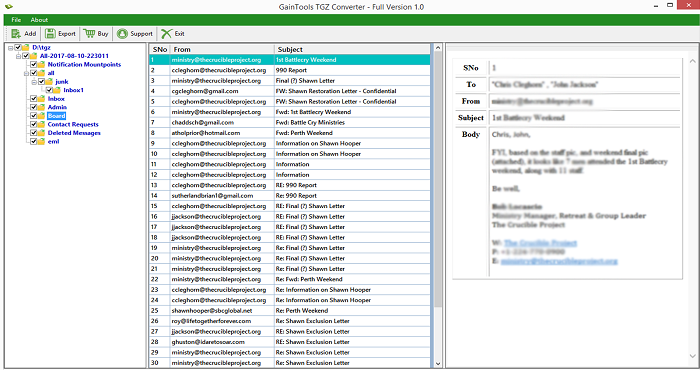
Preview option makes the conversion much better. When the TGZ file is added on the software panel, it is scanned by the tool first and then a preview of complete Zimbra emails is provided. Users can check every item and its accuracy in preview pane.
This feature will also help users to get an idea of how Zimbra files will appear in Microsoft Outlook once they are migrated by the application.
Export desired items from Zimbra
Users can export any TGZ file to PST file format with this application. Moreover, users can also filter items from TGZ file and easily export them to PST file format. Desired internal folders are marked and exported easily to Outlook PST from Zimbra.
Additionally, the application does not disturb the original hierarchy of folders throughout the conversion. It completely retains the same folder structure after the conversion.
Maintains data integrity
The migration of Zimbra files to Outlook gets completed without any harm to any file. The email properties, email components and corresponding attachments are completely preserved meanwhile the migration.
Moreover, the application supports double-byte characters and can be installed easily on Non-English language. The output PST file is generated in UNICODE format and can be imported to all Outlook versions.
Suitable with Zimbra & Outlook editions
The tool easily supports all editions of Zimbra and MS Outlook. No compatibility issues are faced by the application. Every Zimbra edition extracted TGZ file is seamlessly exported to PST by the tool.
- Zimbra: The application supports Zimbra 7.2.8, 7.2.5, 7.0, 2.0.1 and others.
- MS Outlook: The resultant PST can be quickly imported to Outlook 2019, 2016, 2013, 2010, 2007, 2003, and others.
4 steps simple conversion
With Export TGZ to PST Software it is just a 4 steps easy process to convert Zimbra files to Outlook. When you download and install the software on your system, you are required to follow these simple steps -
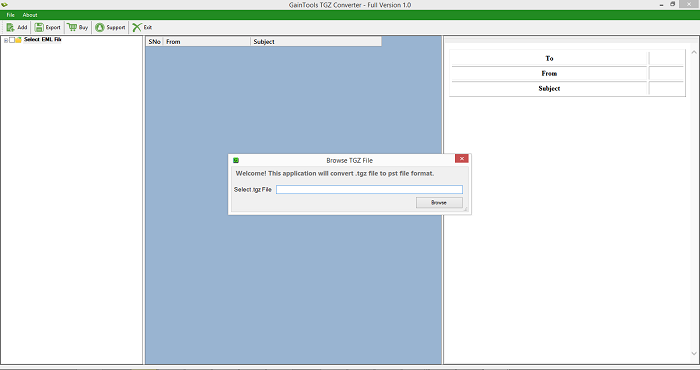
- Add Zimbra TGZ file
- Preview TGZ emails and select items to export
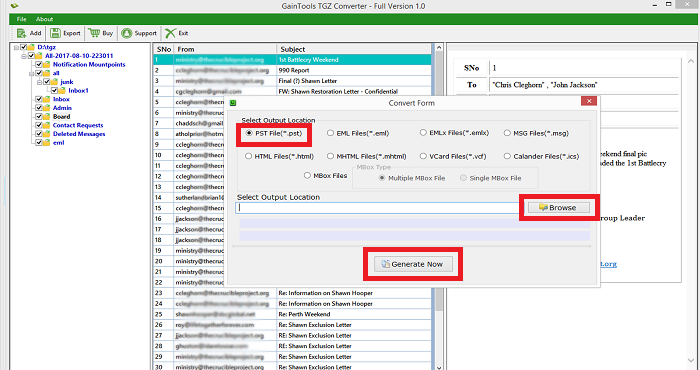
- Choose PST file format
- Mention a location to save PST and hit Convert Now
Zimbra TGZ to PST Free trial
Zimbra TGZ to PST Free trial is offered for all so that users can get familiar with the features and functions of the application before applying for it. The freeware version is same as the licensed one. The only difference is it can convert 10 items per TGZ folder.
Once users find the tool suitable for them after checking demo version, they can apply for the licensed edition and get it activated within a few minutes after registration.
Customer Support 24*7
The application is designed with a motive that it can be handled easily by both technical and non-technical users. No difficulty is faced by any user in handling the application.
Moreover, users can ask for any query to our customer executives which are available 24*7 and completely assist users to perform the conversion and resolve their queries in no time.
CLIENT REVIEWS
"I had recently moved to Outlook 2016. I was using Zimbra earlier to it. Now, to export important emails of Zimbra to Outlook 2016, I tried to find out a suitable application that can easily import TGZ to Outlook and my search ended at Betavare Export TGZ to PST Tool."
- Bentley"The application comfortably exported Zimbra emails to PST format without any file damage. It has easily exported emails as well attachments without hampering the quality and email formatting."
- CarleyFrequently Asked Questions
Only a single TGZ file can be exported at a time. However, no limit on the number of TGZ files conversion with this application.
SOFTWARE SCREENSHOTS