
EXPORT TGZ TO VCF
Total Ratings: 136 - Average Rating: 4.9 out of 5Export contacts of Zimbra to VCF format with Export TGZ to VCF Tool. The app comfortably export complete contact details of Zimbra file to VCF without any harm and data losses.
- Batch conversion of contacts from Zimbra to VCF
- Support all versions of Zimbra desktop
- Instant and trouble-free solution
- Quick analysis of files in preview pane
- Export marked items from Zimbra
- Export TGZ file to VCF with complete contact details
- Save the folder structure intact
- Suitability to all Windows systems
- Comprehensive and easy interface
- Export huge TGZ contact file seamlessly
- Access Zimbra contacts to Outlook, Thunderbird, Lotus Notes, mobile devices, etc
- Output location of user desire
- TGZ to VCF Converter freeware for all
ITEMS TO BE EXPORTED USING TGZ TO VCF EXPORTER
Zimbra 2 VCF Exporter migrates the contact items to VCF file format. The application migrates the complete contact details such as birth date, nickname, name, spouse name, and others into VCF file format.
- Nick name
- Spouse name
- Birth date
- Images
Export TGZ to VCF Tool export entire contact numbers such as primary, business, and home numbers. The software easily moves the complete phone numbers.
- Primary number
- Business number
- Home number
The entire contact addresses are exported from Zimbra file to VCF file format. The contact details include home, business, and other addresses.
- Home address
- Business address
- Other address
Detailed features of Betavare Export Zimbra to VCF Tool
Export all contact information of Zimbra
Export all your Zimbra contacts to VCF file format with Export TGZ to VCF Tool. The tool
efficiently exports entire contact details including contact's name, email address, job
profile, company details, etc.
By exporting Zimbra contacts to vCard file format, one
can access Zimbra contacts on Outlook, Thunderbird, Apple Mail, Lotus Notes, Gmail,
smartphones - iPhone, iPads, etc.
Preserve Meta data and formatting
Zimbra 2 VCF Export Tool keeps all email properties like to, cc, bcc, from, date, time,
subject, read/unread status, embedded images, attachments, signatures, etc. intact
throughout the migration.
The utility preserves complete contact details and does not
hamper the original database meanwhile the conversion. All the contact details are safely
exported from Zimbra file to VCF file format.
Check preview prior export
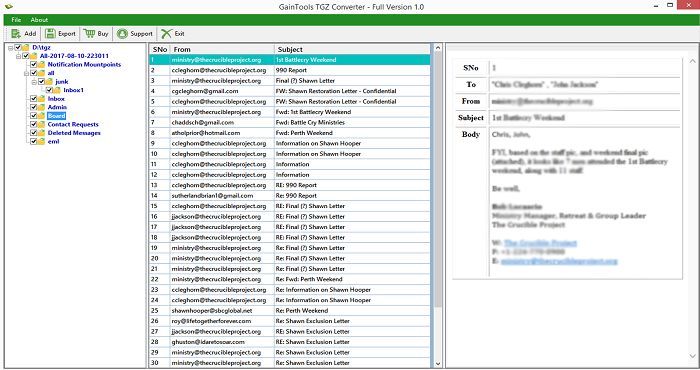
Preview of Zimbra contacts is provided by the tool before finalizing the conversion. Once the
Zimbra contact file is loaded on the software panel, the app scans every contact item and
then displays the complete items.
By getting preview, users can perform the migration
in a better manner by rechecking every item prior the migration. 100% accurate and safe
results are provided by the app.
No file size limits
The tool easily exports every large Zimbra TGZ file without any issues. Without any file
corruption and data loss, one can quickly export any large TGZ file to VCF file
format.
Every large and over-sized TGZ file can be comfortably exported by the
application. There is no effect on the functioning of the software due to the large size of
Zimbra file. The software completes the conversion in a successful manner.
Favor all Zimbra editions
The software supports all versions of Zimbra desktop including Zimbra 7.0, 7.1, 7.2, 7.3, and
others. Moreover, every size TGZ contact file is seamlessly exported to VCF file format with
this app.
No matter with the size and number of contacts hold by Zimbra file, the
application easily exports all contact details without any corruption and changes to them.
Export TGZ to VCF standalone
No prior preparations are required to export Zimbra contacts to VCF file format when you have
Zimbra TGZ 2 VCF Exporter with you. The program is capable enough to export Zimbra contacts
to vCard format with dependency on any email client.
Don't worry if you don't have
Zimbra installed on your system, the conversion can be easily completed without it. Users
can easily export desired contacts from Zimbra to vCard file format.
Download on all Windows OS
The program offers conversion of Zimbra contacts to vCard file format on all editions of
Windows operating system. You can simply install the app on Windows 10, 8.1, 8, 7, XP,
Vista, and others.
Both 64bit and 32bit editions of Windows platforms are supported
by the application without any trouble. No disturbance to the already running tasks on the
system meanwhile the conversion.
Freeware edition for all
Free TGZ to vCard Exporter is available so that users can analyze the performance of the app
before applying for its license. The demo edition works similar to the complete
version.
You can export 10 contacts per folder of TGZ 2 VCF file format with demo
edition. After checking the demo, users can take the license (personal, business, or
enterprise) of the app and export unlimited contacts from Zimbra to VCF file format.
CLIENT REVIEWS
"My client sent me Zimbra contacts file whom I would like to open on my android phone. I don’t have Zimbra client with me and I started searching for the solution. Luckily, I got Betavare Export TGZ to VCF Tool and exported contacts of Zimbra to VCF file format without any losses."
- Terrence"One of my colleagues suggested me this tool. After reading its reviews, I purchase Betavare Zimbra to VCF Tool and did not encounter any issue while performing the conversion."
- JaliyahFREQUENTLY ASKED QUESTIONS
Yes, the application supports all Zimbra desktop versions including 7.0, 7.1, 7.2, 7.2, and others.
No, you can export only healthy Zimbra contact files to VCF with this app.
No, the program suits only Windows platforms. You can't run it on Mac OS.
There is no such limit. Once you have the license keys, you can export multiple Zimbra contacts files to VCF file format.
Yes, export Zimbra contacts to VCF file with this app and then import VCF files to Outlook.
SOFTWARE SCREENSHOTS