
EXPORT MSG FILE
Total Ratings: 170 - Average Rating: 4.9 out of 5MSG Exporter to swiftly convert multiple MSG files to various file formats - PST, MBOX, EML, and EMLX on Windows. Irrespective of MSG file size, one can quickly perform MSG files conversion in 4 simple steps.
- Export single MSG or multiple MSG files at one time
- Migrate MSG files to PST, EML, EMLX, and MBOX
- Permit conversion of any size MSG file to multiple formats
- Export MSG File without Outlook involvement
- Export emails and attachments from MSG file
- Support opening MSG file on Thunderbird, Windows Live Mail, Apple Mail, etc.
- Keep meta properties intact throughout the migration
- Do not disturb the actual folders structure
- Supportable by all versions of Windows OS - XP, Vista, 7, 8, 10
- 100% safe and accurate migration
- Easy to use application
- Full data preview before migration
- MSG Converter Free for understanding the tool
ITEMS TO BE EXPORTED USING MSG EXPORTER
MSG Email Converter performs instant and safe conversion of Outlook MSG emails to PST, EML, EMLX, and MBOX formats. With email attributes and email formatting like to, cc, bcc, sent, from, date, time, hyperlinks, font styles, inline images, etc.
With every email message, the attachments attached with them are safely exported by MSG File Exporter. Along with this, links and images are also exported by the software.
Supported attachment types
Signature, business cards, calendars, etc. are considered by the application.
MSG Exporter exports entire folder of MSG. Along with this, subfolders are also exported by the application without any issues. You can choose any of the mailbox folder like Inbox, Outbox, Sent items, drafts, junk email, etc. and easily export them to any of the formats.
Support all MSG Source Platforms
 Outlook 2019
 Outlook 2016
 Outlook 2013
 Outlook 2010
 Outlook 2007
 Outlook 2003
 Outlook 1997
 Outlook 2000
Detailed features to export MSG File
Batch export MSG file
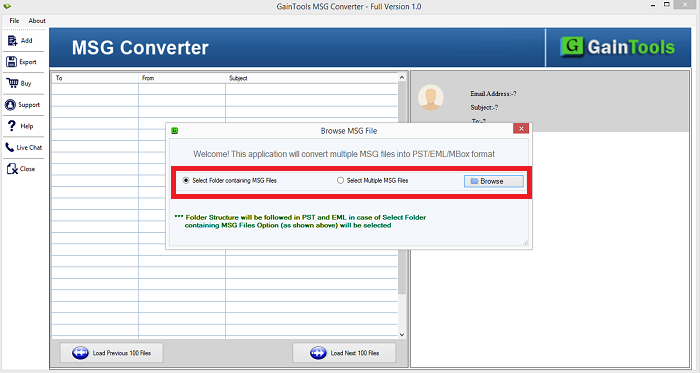
Batch migration of MSG files is supported by MSG File Converter. The tool offers dual mode by which one can easily add MSG files on the software panel.
File - You can choose File mode and add multiple MSG files one by one.
Folder - Having Folder mode, you can load the complete MSG folder and export it to a desired file format.
Using Folder mode, one can save their valuable time and efforts. Hence, huge database can be easily exported in a short span of time.
Full Windows & Outlook compatibility
All editions of Windows and MS Outlook are totally supported by Outlook MSG Email Converter. No matter whether latest or older version of Outlook extracted MSG file you have, the tool considers all & perform migration in an effortless way.
MS Outlook - The software supports all versions of Outlook 2019, 2016, 2013, 2010, 2003, etc.
Windows - The software can be quickly installed on all versions of Windows such as Windows 10, 8.1, 8, 7, Vista, XP, and others.
Convert MSG file to PST & other formats
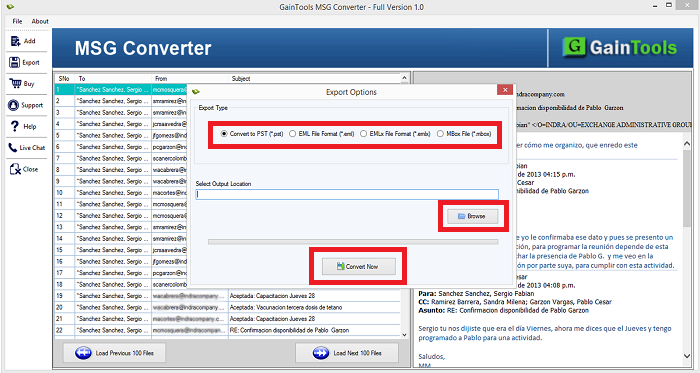
With Export MSG File Tool, several file formats are assigned in which one can save MSG files. Using MSG File Exporter Tool, you can export MSG to PST, MSG to EML, MSG to EMLX, and MSG to MBOX.
By exporting MSG to these formats, one can view MSG file on Thunderbird, Windows Live Mail, Entourage, Apple Mail, KMail, The Bat, Spicebird, etc. Along with attachments, MSG files are comfortably exported to the desired format.
User-decided Output destination
You can easily decide output destination of your choice to save the resultant files. The software does not specify a pre-defined location to save the exported data file. Users can specify any location of their choice and this will help in easy management of the files.
Hardly a few minutes are invested to export MSG file with this powerful application. Its simplified interface helps users in understanding the software in an easy manner.
Live Data Preview
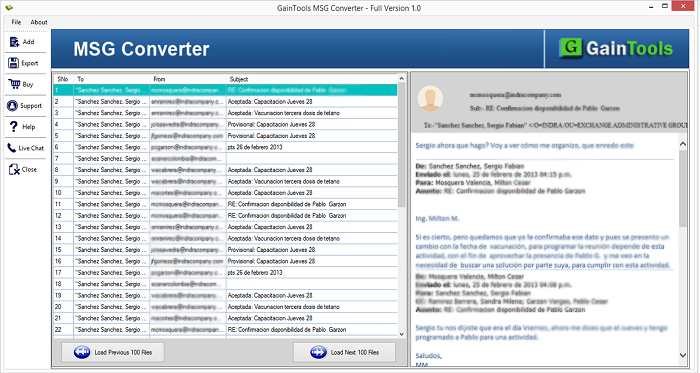
Complete preview of added MSG files is displayed by the software. The conversion process starts from scanning the loaded MSG files and after that a preview of the uploaded MSG files is generated by the software. This will help in better conversion.
After getting preview of the files, users can choose desired items to export into a desired file format. For more details, users can contact our support team which is available 24*7 to assist users.
Include attachments
MSG Email Converter supports all attachments conversion with emails. Without any issue and delays, one can export MSG emails to PST and other formats. Without restricting the size of MSG file, MSG files can be easily exported.
Without considering the type of attachment, all the attachments are safely exported from MSG file. All heavy and oversized MSG files are comfortably migrated by the application.
Free MSG File Converter
To understand the software free of cost, download demo version of MSG Converter which is available for all. After evaluating the functions of the application, one can easily move ahead to purchase the software.
With the trial edition, one can export only 10 MSG files to a desired file format. Apart from this, all functions of demo version are same as the paid one.
Outlook Installation is not needed
Installing Microsoft Outlook is not at all mandatory to complete the conversion. If you don't have MS Outlook with you, still you can easily migrate MSG files. MSG file of all editions of Outlook are supported by the program.
Only you should have healthy MSG files with you and the software completes the conversion without getting any errors. The software can be easily utilized both for business and home purposes.
CLIENT REVIEWS
"Manually, it was too tough to export MSG file to EMLX format. Then, one of my friends suggested me MSG Conversion Tool. It has completely exported MSG data to EMLX file format. 100% safe and secure conversion is performed by the software."
- Gerald"Truly a commendable tool! I liked multiple features of this converter like bulk conversion, export to several formats, fast conversion speed, etc. I would like to suggest this application to my friends."
- AlbertoFrequently Asked Questions
SOFTWARE SCREENSHOTS